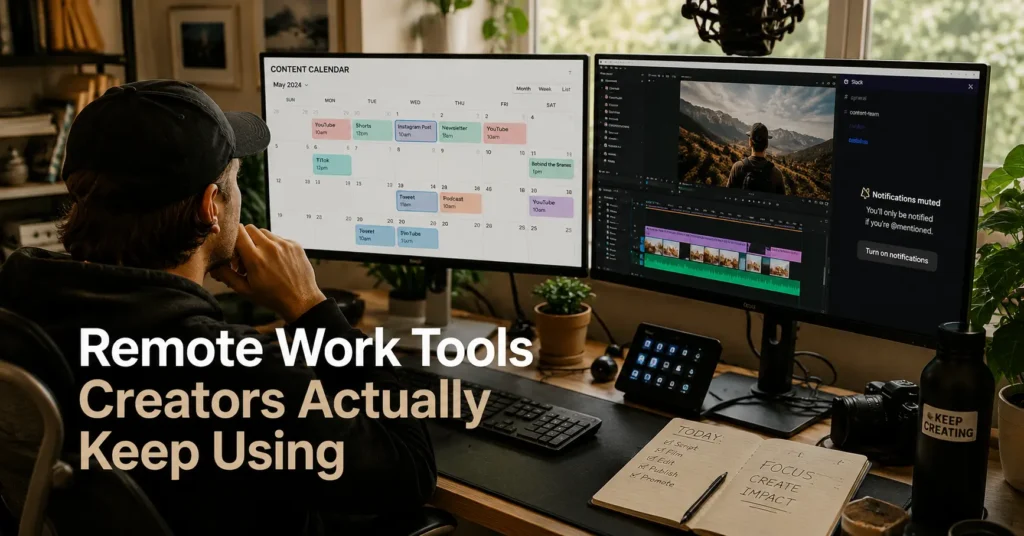
The first thing most creators overbuild is the tool stack. Not the audience. Not the content strategy. The stack.
A planning app becomes three planning apps. Notes move into databases. Databases move into dashboards. Then notifications start arriving from six places at once and nothing feels organised anymore. The system looks productive right up until a deadline slips because the thumbnail draft lived in the wrong folder.
That is usually where the real review of remote work tools creators use begins.
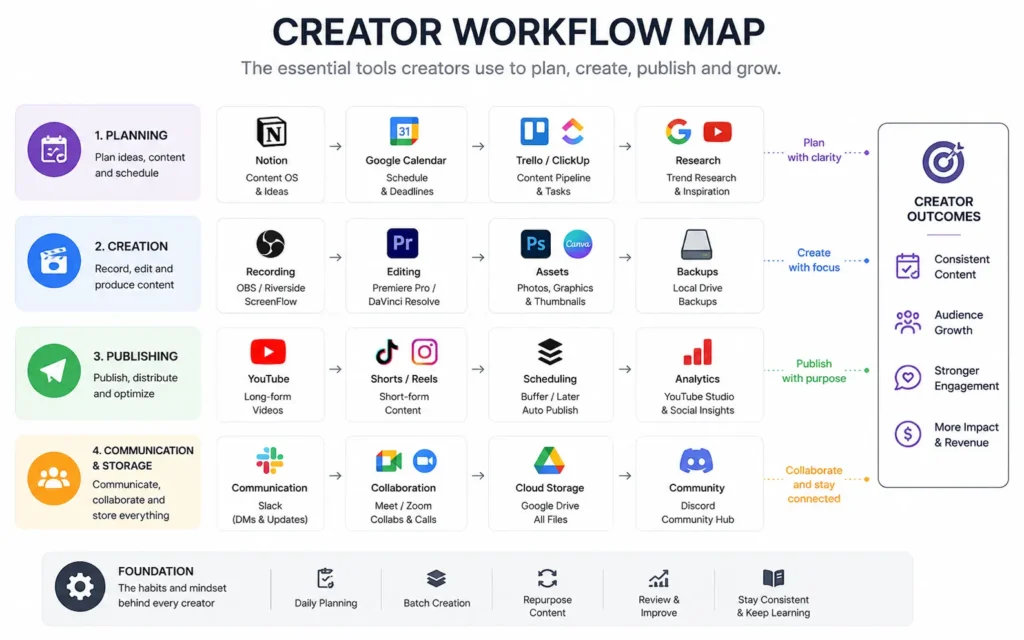
The best creator productivity tools do not create a second job. They reduce switching, keep publishing predictable, and survive busy weeks without needing constant maintenance. And the creators with the cleanest systems are rarely the ones using the most software. They are usually the ones who removed the most friction.
Quick Facts: The Creator Tools Worth Building Around
| Task | Recommended Tool | Best For | Limitation | Verdict |
|---|---|---|---|---|
| Planning | Notion | Editorial calendars and lightweight systems | Easy to overbuild | Strong for solo creators |
| Fast task tracking | Trello | Visual publishing workflows | Weak document handling | Better than complex PM tools for most creators |
| Team communication | Slack | Async collaboration and client channels | Notification overload | Works best with strict channel rules |
| Video meetings | Google Meet | Low-friction calls | Limited advanced production controls | Stable for creator teams |
| File storage | Google Drive | Shared drafts and assets | Folder sprawl becomes a problem fast | Reliable default option |
| Publishing automation | Buffer | Multi-platform scheduling | Analytics are limited on lower tiers | Good continuity tool |
| Long-form writing | Obsidian | Offline writing and linked notes | Sync setup requires effort | Better for writers than marketers |
(2025–2026 rates — verify before purchase)
What to Look For in a Remote Work Tool Before You Commit
The wrong productivity tool does not fail immediately. It fails quietly.
Usually through maintenance.
You stop updating it. The workflow becomes too complicated. Notifications multiply. The setup starts demanding attention instead of saving it. And creators are especially vulnerable to this because most creator work already spans multiple systems: editing, publishing, invoicing, messaging, sponsorships, research, storage, and scheduling.
The practical test is simple:
Can you still use the tool properly during a chaotic week?
That matters more than feature count.
A remote work stack for creators should reduce:
- app switching,
- duplicate task entry,
- lost approvals,
- and unclear publishing status.
It should also survive offline work, sync reliably across devices, and avoid locking critical files into one platform. Offline support matters more than people admit — especially during travel or unstable connections.
One strong take here: most solo creators do not need enterprise project management software. They need consistency.
And consistency usually comes from fewer moving parts.
Planning Tools That Reduce App Switching Instead of Adding It
Notion became the default recommendation for creators because it combines notes, lightweight databases, calendars, and collaboration in one place. The problem is what happens after month three.
People start building operating systems instead of workflows.
The honest negative: Notion rewards people who enjoy maintaining systems. If you are constantly redesigning dashboards instead of publishing work, the tool has become the hobby.
For solo creators, the strongest setup is often:
- one content calendar,
- one project database,
- one capture inbox,
- and one publishing checklist.
Nothing else.
Trello remains the better choice for creators who think visually and publish fast. Especially YouTube creators, podcast teams, or newsletter operators managing repeatable production stages. Dragging a task from “Script” to “Edit” to “Scheduled” is clearer than hiding status inside database properties.
But Trello breaks down once documentation becomes heavy.
That is where Notion wins.
The alternative most people ignore is Obsidian. Writers who work offline or maintain research-heavy projects often stay with it longer because files remain local Markdown documents instead of locked platform data. Sync setup takes more effort, though — especially across Windows, Mac, and mobile devices.
(Feature sets and integrations change without notice)
Publishing Tools That Survive Real Content Schedules
The publishing layer matters because consistency fails first during busy periods.
A scheduling tool should remove repetitive work without adding another review queue. Buffer does this better than most creator-focused publishing platforms because the interface stays narrow. Queue content. Review timing. Publish.
That simplicity matters.
Creators often buy publishing suites with analytics, AI captions, approval workflows, brand kits, inboxes, and campaign dashboards — then end up using 15% of the platform.
The real bottleneck is usually not publishing. It is preparation.
A good workflow separates:
- draft creation,
- asset review,
- scheduling,
- and post-publish tracking.
And the fragile part is almost always file organisation. Especially thumbnails, short-form edits, sponsor versions, and caption revisions.
Google Drive works because almost everyone already understands it. But shared drives become messy quickly if folders are named by platform instead of project. “Instagram Final Final V2” is still alive in 2026. Somehow.
Dropbox remains better for creators moving large video files between editors because sync behavior is more predictable under heavy upload conditions. But the storage cost climbs fast once raw footage accumulates.
(Specifications and pricing change without notice)
Which Communication Tool Actually Reduces Message Chaos
Email is not collaboration. Chat is not project management. Video meetings are not documentation.
Treating them as interchangeable creates most remote communication problems.
Slack works well for creator teams because channels preserve context better than email chains. A sponsorship thread, editing request, and publishing deadline can remain separated instead of collapsing into one inbox.
But Slack punishes teams without notification discipline.
If every message becomes urgent, the tool becomes exhausting within weeks.
The practical fix:
- default to async communication,
- reserve meetings for approvals or blockers,
- and keep publishing decisions searchable.
Async communication means work does not require everyone to respond immediately. It reduces interruption load and protects focus blocks — especially for editing, writing, or design work.
Google Meet remains the lowest-friction meeting option for most creators because browser access is simple and setup overhead stays low. Zoom still wins for webinar-style events or advanced recording control.
The honest alternative here is smaller than most teams expect:
some creator businesses run better on shared docs plus scheduled check-ins than permanent chat systems.
Because fewer channels often means fewer lost decisions.
File Storage and Collaboration Tools That Do Not Collapse Under Version Confusion
The most expensive productivity mistake is not usually software pricing.
It is lost work.
Version confusion destroys time quietly. Especially when creators outsource editing, design, transcription, or thumbnails.
Google Drive succeeds because collaboration is immediate and permissions are easy to manage. But it rewards strict folder discipline. Without naming conventions, the workspace becomes a landfill after six months.
One real-world fix that works:
Use project-first folders instead of platform-first folders.
So:
- Client-X > Podcast Episode 12
instead of: - YouTube > Audio > Exports > Final
That single change reduces search friction more than most creators expect.
Dropbox is stronger for large asset syncing. Google Drive is stronger for lightweight collaboration. And OneDrive fits best for creators already living inside the Microsoft ecosystem.
Most creators do not need all three.
What It Actually Costs to Build a Creator Remote Work Stack
| Tier | Typical Stack | Monthly Cost | Best For | Trade-Off |
|---|---|---|---|---|
| Budget | Trello + Google Drive + Google Meet | $0–$15 | Solo beginners | Limited automation |
| Mid-range | Notion + Slack + Buffer + Drive | $35–$90 | Consistent publishing workflows | Maintenance overhead grows |
| Worth-the-splurge | ClickUp + Dropbox + Riverside + advanced scheduling tools | $150+ | Multi-person creator operations | Complexity rises quickly |
(2025–2026 rates — verify before purchase)
The uncomfortable truth: creators usually hit workflow failure before tool limitations.
Buying more software rarely fixes inconsistent systems.
What to Use Instead of the “Everything App” Approach
The strongest creator remote work stack is usually boring.
One planning system. One communication layer. One storage location. One publishing workflow.
That is enough for most people making content consistently.
The “everything app” promise sounds efficient until setup maintenance becomes part of your weekly workload. And once the system becomes fragile, creators stop trusting it. That is the real failure point.
Optimise for continuity instead of tool count.
Because the best remote work stack is the one you still use during launch week, client revisions, missed sleep, and three overlapping deadlines.
Not the one that looked organised on YouTube.
Productivity and Remote Work Tech connects deeper workflow, setup, and remote work system guides for creators building sustainable operations.
Frequently Asked Questions
What are the best remote work tools creators can start with?
Most creators can start with one planning tool, one communication tool, and one storage platform. Trello, Google Drive, and Google Meet are usually enough at the beginning because maintenance stays low and onboarding is simple.
Which creator productivity tools are easiest to maintain?
Tools with narrow workflows tend to last longer. Trello, Buffer, and Google Drive work well because they focus on one job instead of turning into large operating systems that require constant restructuring.
Do solo creators need Slack?
Not always. Slack becomes useful once collaborators, editors, sponsors, or contractors enter the workflow regularly. Solo creators often work better with scheduled reviews and shared documents instead of persistent chat systems.
What is the biggest remote workflow mistake creators make?
Most creators add tools faster than they simplify processes. App switching becomes the hidden tax. A cluttered workflow usually creates more missed work than a limited tool stack does.
Which remote work stack works best for creators managing video files?
Dropbox remains one of the stronger options for large media transfers and sync reliability. Google Drive works better for lightweight collaboration and shared documentation workflows.
Continue Exploring
- Productivity and Remote Work Tech expands into workflow systems, communication setups, and creator-focused productivity infrastructure.
- SaaS comparison workflow tools breaks down where productivity platforms help, where they create overhead, and which setups survive daily use.