Most people searching “vpn vs tor” are not trying to disappear from an intelligence agency. They want to stop tracking, avoid surveillance on public Wi-Fi, bypass regional restrictions, or keep browsing activity away from their internet provider. Those are different problems. And the wrong tool creates new ones.
The first thing many people notice after installing Tor is not anonymity. It’s delay. Pages stall. Videos buffer. CAPTCHAs multiply. Some websites block access completely because Tor exit nodes are heavily abused. Meanwhile, a decent VPN often feels almost invisible during normal use — until you realize you moved trust from your internet provider to the VPN company instead.
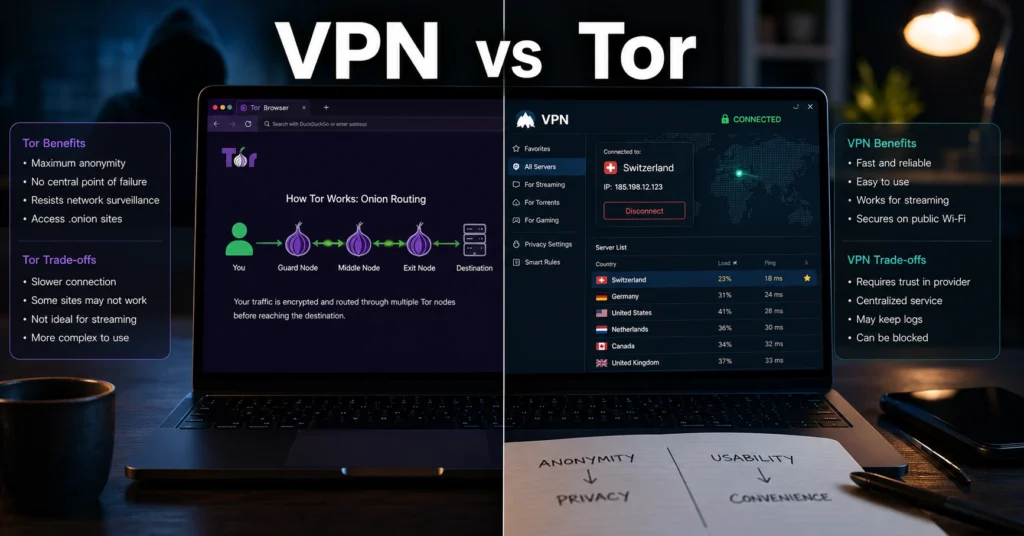
That is the actual decision here: anonymity versus usability. One tool prioritizes concealment. The other prioritizes practical privacy with tolerable speed. And they are not interchangeable.
Comparison Table — VPN vs Tor in Practical Use
| Option | Price | Best For | Limitation | Verdict |
|---|---|---|---|---|
| VPN | $3–$15/month depending on provider (2025–2026 rates — verify before purchase) | Streaming, remote work, public Wi-Fi, daily browsing | Requires trust in VPN provider logging practices | Best choice for most people |
| Tor Browser | Free | High-anonymity browsing and identity separation | Slow speeds and blocked access on many sites | Best for anonymity, not convenience |
| Tor over VPN | VPN subscription + Tor | Extra privacy from ISP visibility | Slower than either option alone | Useful for specific privacy-sensitive cases |
| VPN over Tor | Complex manual setup | Specialized threat models | Difficult to configure correctly | Usually unnecessary |
Quick verdict — most people need a VPN, not Tor
For normal browsing, streaming, work logins, and public Wi-Fi use, a VPN is the better fit. It is faster, easier to maintain, and far less disruptive to everyday internet use.
Tor is better when anonymity matters more than convenience. Journalists, researchers, whistleblowers, and people operating under censorship regimes have different priorities than someone trying to watch region-locked sports streams safely from a hotel Wi-Fi network.
The blunt truth: most people who switch entirely to Tor abandon it within days because normal websites become frustrating to use. That frustration matters. Security tools fail when people stop using them.
What a VPN actually hides — and what it still exposes
A Virtual Private Network creates an encrypted tunnel between your device and the VPN provider’s server. Your internet provider can see that you connected to a VPN, but it cannot easily inspect the websites or services moving through that tunnel.
That solves several real problems:
- Public Wi-Fi snooping
- ISP-level traffic monitoring
- Basic location masking
- Region-locked content access
- Network throttling on some providers
But VPN marketing often skips the uncomfortable part: the VPN company itself becomes a trust layer.
If the provider logs connection timestamps, IP addresses, or DNS requests, your privacy depends on its internal practices, legal jurisdiction, and retention policies. Some providers have proven no-log claims during legal investigations. Others quietly changed policies after acquisition deals or ownership shifts. (Policies change without notice)
And there is another limit many buyers miss: a VPN does not make your browser fingerprint disappear. If you stay logged into Google, Facebook, Amazon, or TikTok while using a VPN, those services still recognize you immediately.
That surprises people the first time they test it.
What Tor does differently when anonymity matters more than speed
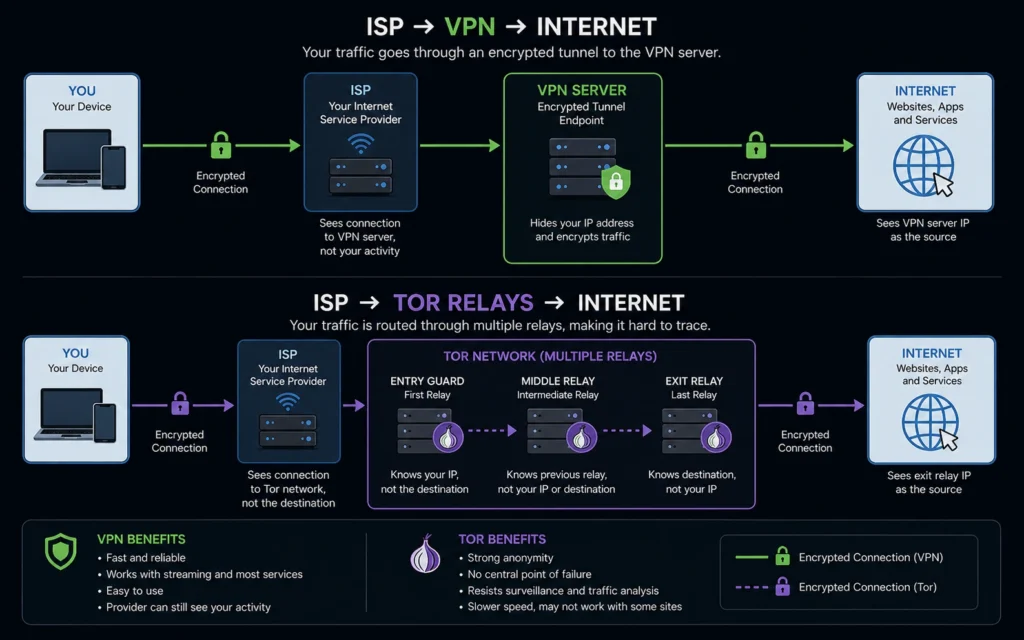
Tor — short for The Onion Router — routes traffic through at least three encrypted relays before it reaches the destination website. Each relay only knows the previous and next hop. That layered routing makes tracing the original connection significantly harder.
Unlike a VPN, Tor is designed around anonymity first.
That difference changes everything:
- Traffic moves slower
- Latency increases sharply
- Some websites block access
- Streaming quality drops badly
- Large downloads become painful
A practical example: opening a normal news site over a commercial VPN might take one or two seconds. The same page through Tor can take five to fifteen seconds depending on relay congestion and geographic routing.
And some services simply refuse the connection entirely. Banking portals, airline sites, and e-commerce fraud systems often flag Tor exit nodes as suspicious traffic.
This is the honest negative most “tor vs vpn” explainers avoid: Tor is excellent at what it was designed for. It just was not designed for comfortable everyday internet use.
VPN vs Tor for streaming, banking, work, and everyday browsing
This is where the decision usually becomes obvious.
Streaming
VPNs win immediately. Good providers maintain optimized servers that still work with services like Netflix, Disney+, and Amazon Prime Video. Tor is generally unusable for high-bitrate streaming because relay speeds fluctuate constantly.
Banking and financial accounts
Tor often triggers fraud detection systems. A VPN usually causes fewer issues if you connect through servers geographically close to your normal location.
Still, constantly switching countries through VPN servers can also trigger account verification checks. That catches people off guard during travel.
Remote work
Corporate VPNs, identity verification systems, Slack logins, and Microsoft 365 authentication flows frequently break or challenge Tor traffic. Commercial VPNs behave more predictably.
Anonymous browsing
Tor wins here. Especially if you separate identities properly and avoid logging into personal accounts during the same session.
But identity separation is harder than most people expect. One accidental Gmail login destroys the anonymity model quickly.
The part most privacy guides skip: your browser fingerprint still matters
This is where many privacy setups quietly fail.
Even with a VPN or Tor, websites can still identify devices using browser fingerprinting — a technique that combines screen size, installed fonts, browser version, language settings, GPU behavior, extensions, timezone, and rendering quirks into a surprisingly identifiable profile.
Tor Browser intentionally standardizes many of these characteristics to reduce uniqueness. Most VPN users do not change anything about their browser setup, which means tracking systems still recognize them across sessions.
So if your goal is reduced tracking rather than complete anonymity:
- Use privacy-focused browsers
- Limit extensions
- Block third-party trackers
- Separate work and personal browsing
- Use different browser profiles
The privacy tool is only one layer. Your browsing habits matter more than the homepage promises.
Tor over VPN vs VPN over Tor — one setup is mostly unnecessary
People love diagram-heavy privacy setups online. Most of them create complexity without solving a real problem.
Tor over VPN
This setup means:
- Connect to VPN first
- Launch Tor Browser afterward
Your ISP sees VPN traffic instead of Tor traffic. The Tor entry node sees the VPN server instead of your home IP address.
That is the safer and simpler combined setup for most advanced users.
VPN over Tor
This routes VPN traffic through the Tor network before reaching the VPN server.
It sounds stronger on paper. In practice, setup complexity increases sharply, performance becomes worse, and troubleshooting turns miserable — especially when DNS leaks or login systems fail unexpectedly.
Most people do not need this.
The honest answer is boring but useful: a well-configured VPN already solves the majority of everyday privacy concerns.
The differences that change the decision
The biggest difference between VPN and Tor is not encryption strength. It is operational friction.
VPNs are designed to disappear into your workflow. Tor changes the workflow itself.
That matters because convenience affects consistency:
- If a tool slows browsing too much, people disable it.
- If websites constantly fail, people stop using it.
- If streaming breaks every evening, people revert to normal browsing.
Tor asks you to tolerate friction in exchange for stronger anonymity.
VPNs ask you to trust a provider in exchange for speed and usability.
Neither trade-off is free.
Choose a VPN if you need privacy without destroying usability
A VPN is the practical choice if you:
- Travel frequently
- Use hotel or airport Wi-Fi
- Stream region-locked content
- Work remotely
- Want less ISP visibility
- Need stable mobile performance
- Care about speed
Use providers with:
- Independent audits
- Transparent ownership
- RAM-only server infrastructure
- Clear no-log policies
- Reliable kill switches
And avoid free VPNs for anything sensitive. Many free providers monetize through advertising, data collection, or bandwidth limits that make the service barely usable anyway.
Choose Tor if anonymity matters more than convenience
Tor is the stronger choice if:
- Identity separation matters
- You operate under censorship
- You need anonymous research
- You cannot trust local network monitoring
- Exposure risk is serious
But use it realistically.
Tor is not a magic invisibility button. Browser mistakes, account logins, malware, downloads, and behavioral tracking still expose people regularly. The technology works better than the humans operating it.
And if speed is critical, Tor may not be practical.
Cost comparison: VPN subscriptions vs Tor’s real trade-off
Tor itself is free.
The cost is time, friction, slower browsing, blocked sessions, and limited compatibility with modern web platforms.
VPN pricing varies widely:
- Budget providers: $2–$4/month on long-term plans
- Mid-range providers: $5–$9/month
- Premium providers: $10–$15/month with extra features and independent audits
(2025–2026 rates — verify before purchase)
The cheaper providers usually cut corners somewhere:
- Smaller server networks
- Weak support
- Congested locations
- Limited transparency
- Aggressive upsells
A slow VPN eventually creates the same problem as Tor: people stop using it.
Final recommendation — use the tool that matches the risk
If your goal is practical privacy, safer public browsing, streaming access, and reduced ISP tracking, choose a good VPN and keep using it consistently.
If your goal is strong anonymity and identity separation, Tor is the better tool — as long as you accept the slower speeds and operational friction that come with it.
The mistake is assuming they solve the same problem equally well.
They do not.
Frequently Asked Questions About VPN vs Tor
Is Tor safer than a VPN?
Tor provides stronger anonymity because traffic moves through multiple encrypted relays instead of a single provider-controlled tunnel. A VPN is usually easier to trust operationally if the provider has independent audits and transparent logging policies.
Can your ISP see Tor usage?
Usually yes. Internet providers can often detect Tor network traffic unless you use bridges or connect through a VPN first. They generally cannot see the browsing contents inside the Tor connection.
Does a VPN stop browser tracking?
Not by itself. A VPN hides network traffic from your ISP, but websites can still track browser fingerprints, cookies, and account logins unless you change browser behavior too.
Why do websites block Tor users?
Tor exit nodes are frequently abused for spam, scraping, and fraud attempts. Many platforms automatically challenge or block Tor traffic to reduce abuse and account takeover attempts
Continue Exploring
- VPN, Privacy, Cybersecurity
A broader breakdown of VPN use cases, provider differences, and practical privacy setups beyond basic comparisons. - best VPNs for public Wi-Fi
Focuses on hotel, airport, café, and travel-network protection where VPN usability matters more than maximum anonymity.