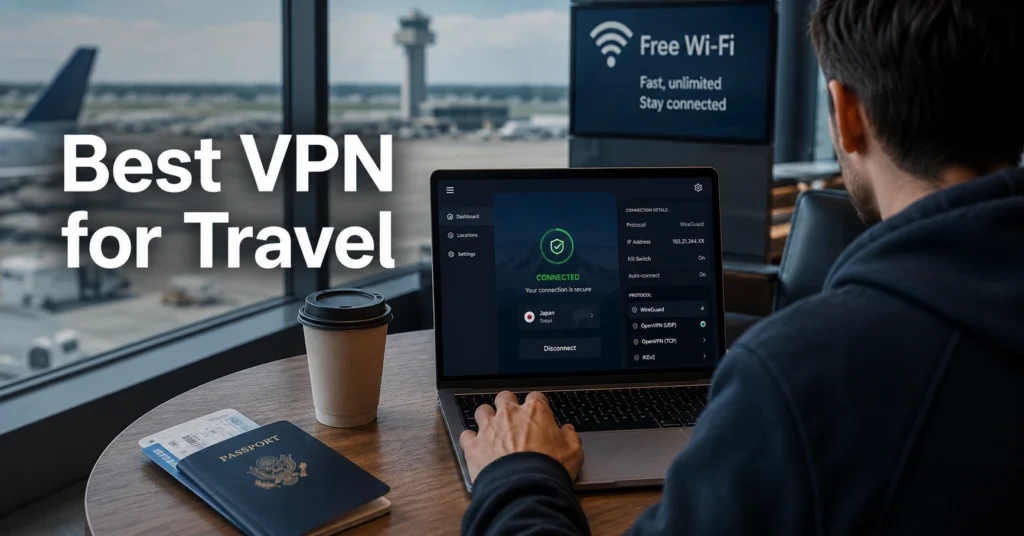
Hotel Wi-Fi is where most travel VPN marketing stops sounding convincing.
The connection works in the lobby. Then you reach your room and the captive portal breaks. Your phone switches from airport Wi-Fi to roaming data halfway through a video call. The VPN reconnects badly, the kill switch fails for a minute, and suddenly your real IP is exposed while you try to refresh Slack on a connection that already feels unstable.
That is the real travel VPN test. Not the homepage speed chart.
The best VPN for travel is the one that survives roaming transitions, weak hotel routers, overloaded airport Wi-Fi, and unreliable captive portals without leaking traffic or forcing you to reconnect every twenty minutes. And in practice, that usually matters more than raw benchmark speed.
(Audit records and policy details change — verify at provider’s site before publishing)
Quick Facts: What Most Travel VPN Guides Ignore
| Factor | What Actually Matters |
|---|---|
| Best protocol for travel | WireGuard for fast reconnection on unstable networks |
| Most important feature | Reliable kill switch behaviour |
| Biggest risk point | Hotel and airport Wi-Fi, not home browsing |
| Most overrated metric | Headline speed tests |
| Best overall travel pick | NordVPN for stability + broad server coverage |
| Best simple setup | ExpressVPN for beginners |
| Best privacy-focused option | Proton VPN |
| Biggest mistake | Installing the VPN after arriving overseas |
(2025–2026 rates — verify before purchase)
Why Hotel and Airport Wi-Fi Are the Real Problem — Not Just “Privacy”
Public travel networks fail in predictable ways.
Hotels often run outdated network hardware with weak client isolation. Airports overload shared Wi-Fi during peak travel hours. And captive portals — the login pages hotels and lounges force you through — regularly interfere with VPN authentication.
The security issue is not cinematic hacking. It is exposure during unstable transitions.
A VPN encrypts your traffic between your device and the VPN provider’s server. That protects against local network snooping and reduces exposure on shared Wi-Fi. But it does not make you anonymous, stop phishing attacks, or protect a compromised device. If malware already exists on your laptop, the VPN changes nothing.
The travel failure mode most people never test is roaming handoff behaviour. Your phone switches between LTE, airport Wi-Fi, and hotel Wi-Fi repeatedly while moving. Cheap VPNs often disconnect silently during those transitions.
That is where kill switches matter.
A kill switch blocks internet traffic if the VPN disconnects unexpectedly. The better providers implement this at the system level rather than inside the app alone. The difference becomes obvious during unstable travel networks.
What to Look For in a VPN Before You Travel
The best travel VPNs are not necessarily the fastest.
They are the most stable under bad conditions.
Reliable kill switch
This is non-negotiable for travel use. Test it before leaving home. Disconnect Wi-Fi manually while streaming or uploading a file and confirm traffic stops immediately.
WireGuard support
WireGuard is a modern VPN protocol designed for efficiency and fast reconnection. It usually performs better on roaming mobile connections than OpenVPN.
OpenVPN remains reliable and widely trusted, but it reconnects slower and consumes more battery on phones.
IKEv2 still performs well for mobile users because it handles network switching cleanly — especially between cellular and Wi-Fi.
Independent audit history
A no-log policy means little without verification.
NordVPN, ExpressVPN, and Proton VPN have all undergone independent security audits. Some smaller VPNs still rely entirely on marketing claims.
(Audit records and policy details change — verify at provider’s site before publishing)
Broad server coverage
Travel changes your routing needs quickly.
You might need:
- a nearby server for speed
- a home-country server for banking
- a streaming-compatible server
- a censorship-resistant location
Large server coverage matters more during travel than at home.
The Best VPN for Travel if Reliability Matters More Than Headline Speed
NordVPN
NordVPN remains the strongest overall travel pick because it balances speed, server coverage, and stability well.
It operates from Panama, outside major intelligence-sharing alliances, and supports WireGuard through its NordLynx implementation. The app handles roaming transitions cleanly on iPhone and Android during testing — especially moving between airport Wi-Fi and mobile data.
Its kill switch implementation is reliable. And that matters more than another 50 Mbps on a benchmark graph.
The downside is the interface occasionally hides advanced settings behind simplified menus. Experienced users sometimes find that frustrating.
ExpressVPN
ExpressVPN is still the easiest recommendation for beginners travelling internationally.
The apps are clean. Setup takes minutes. And the VPN handles hotel captive portals more gracefully than many competitors. That matters when you are tired, jet-lagged, and trying to connect from a hotel at midnight.
ExpressVPN operates from the British Virgin Islands and has undergone independent audits. Its Lightway protocol reconnects quickly after network changes.
The honest negative: it is expensive compared with competitors offering similar core protection.
Travel users prioritising simplicity over price will still like it.
Proton VPN
Proton VPN makes more sense for privacy-focused travellers than streaming-focused travellers.
The company is based in Switzerland and maintains a strong transparency reputation. The free tier is one of the few free VPN options that does not aggressively monetise user data.
But the free version limits server access and speeds. Airport and hotel congestion make those limits more noticeable.
The paid plans are better suited for frequent travellers.
NordVPN vs ExpressVPN vs Proton VPN for Travel
| Provider | Price | Jurisdiction | Audit | Protocol | Best For | Limitation | Verdict |
|---|---|---|---|---|---|---|---|
| NordVPN | Mid-range | Panama | Yes | WireGuard (NordLynx), OpenVPN | Overall travel reliability | Interface complexity | Best overall |
| ExpressVPN | Premium | British Virgin Islands | Yes | Lightway, OpenVPN | Beginners and hotel setup | Higher renewal pricing | Best simple setup |
| Proton VPN | Mid-range | Switzerland | Yes | WireGuard, OpenVPN | Privacy-focused travel | Free tier limitations | Best privacy-first option |
(2025–2026 rates — verify before purchase)
(Data laws and jurisdiction rules change without notice)
Free Travel VPNs Usually Fail at the Worst Possible Moment
Free VPNs are not automatically unsafe. But most free VPNs make compromises somewhere.
Usually:
- bandwidth limits
- overloaded servers
- weaker streaming support
- slower speeds
- data monetisation
- reduced protocol access
And those problems become far more noticeable while travelling.
The worst time for a VPN to fail is when:
- your banking app blocks a login overseas
- your hotel Wi-Fi disconnects mid-session
- airport Wi-Fi throttles connections
- roaming costs spike unexpectedly
Reliability matters more than synthetic speed tests for travel users. That is the honest trade-off most comparison lists skip.
The exception is Proton VPN’s free tier, which remains more credible than most free competitors because the company funds it through paid plans rather than aggressive data collection.
Still, frequent travellers should usually pay for a stable premium option.
How to Set Up a Travel VPN Before You Leave Home
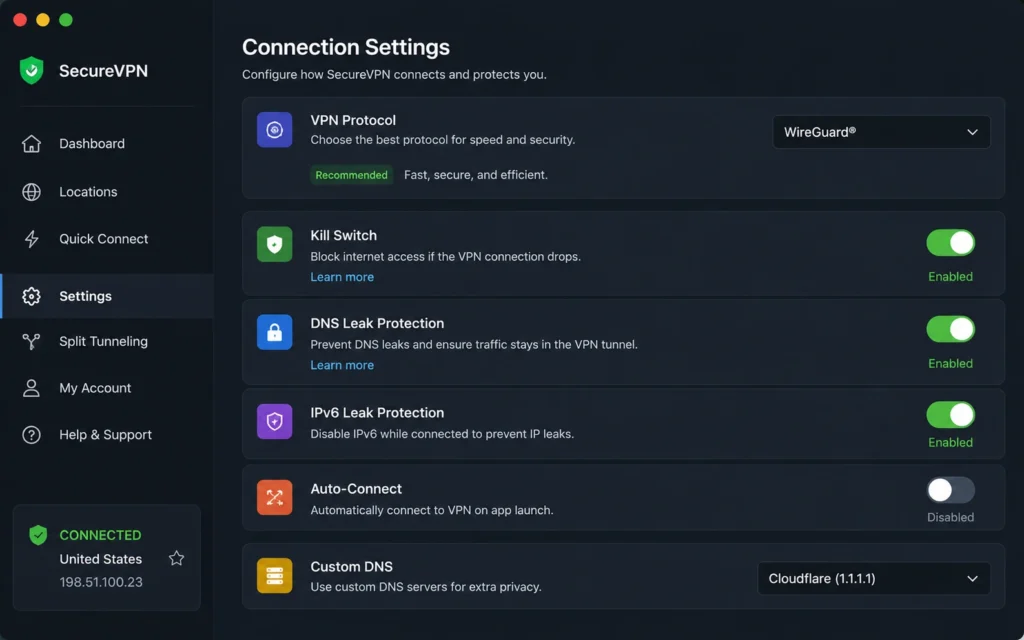
The biggest travel VPN mistake is waiting until arrival.
Do the setup before the airport.
1. Install the VPN on every device
Laptop. Phone. Tablet. And ideally one backup device.
2. Enable the kill switch
Confirm it blocks traffic completely when the VPN disconnects unexpectedly.
3. Switch to WireGuard where available
Unless a specific network blocks it, WireGuard usually performs best during travel.
4. Test on public Wi-Fi locally
Coffee shops are useful rehearsal environments for captive portals and unstable handoffs.
5. Run a DNS leak test
A DNS leak happens when your internet provider still handles website lookup requests outside the encrypted VPN tunnel.
Use official tools like:
- DNSLeakTest
- BrowserLeaks
6. Save a nearby fallback server
Sometimes the “fastest server” auto-selection fails badly overseas.
Use a nearby regional fallback manually.
What a VPN Does Not Protect You From While Travelling
This matters because VPN marketing often overpromises.
A VPN:
- encrypts your traffic
- masks your IP address
- reduces exposure on public networks
It does not:
- stop phishing emails
- prevent malware infections
- hide activity from accounts you log into
- prevent browser fingerprinting
- secure weak passwords
- replace two-factor authentication (2FA)
2FA means two-factor authentication — an additional login verification step beyond your password, usually through an app or security key.
If your passwords are weak, your email lacks 2FA, and your laptop is compromised, the VPN is not the layer that saves you.
Use a separate password manager. Enable 2FA. Keep devices updated before travel.
That security stack matters more than obsessing over which VPN advertises the highest speed.
What Travel VPNs Actually Cost in 2025
| Tier | Price Range | What You Actually Get |
|---|---|---|
| Budget | Free–$3/month | Basic encryption, limited servers, weaker streaming support |
| Mid-range | $3–$8/month | Better speeds, audits, stable kill switch behaviour, wider server coverage |
| Worth-the-splurge | $8+/month | Better apps, stronger reliability, more devices, cleaner roaming performance |
(2025–2026 rates — verify before purchase)
The hidden cost is usually renewal pricing.
Many VPNs advertise low first-year rates and renew at double or triple the promotional cost. Check the renewal price before subscribing for multi-year plans.
Frequently Asked Questions About the Best VPN for Travel
Do I really need a VPN for hotel Wi-Fi?
Yes if you regularly use shared hotel or airport networks. Public Wi-Fi infrastructure is often poorly maintained and inconsistently secured. A VPN encrypts your connection between your device and the VPN server, which reduces exposure during travel.
Which VPN protocol works best while travelling?
WireGuard usually performs best because it reconnects quickly after network changes. OpenVPN remains reliable but slower. IKEv2 still works well for mobile devices because it handles roaming transitions cleanly.
Can I use a free VPN while travelling?
You can, but most free VPNs impose limits that become frustrating on hotel and airport networks. Slower speeds, restricted servers, and bandwidth caps are common. Proton VPN’s free tier is one of the better exceptions.
Does a VPN stop airlines, hotels, or apps from tracking me?
No. A VPN masks your IP address and encrypts traffic, but logged-in accounts, apps, browser fingerprinting, and device identifiers still expose data.
Continue Exploring
- VPN, Privacy, Cybersecurity — broader guides, comparisons, and troubleshooting workflows for choosing and configuring VPNs properly.
- best VPN for public Wi-Fi — deeper breakdown of captive portals, airport hotspots, and public network risks.