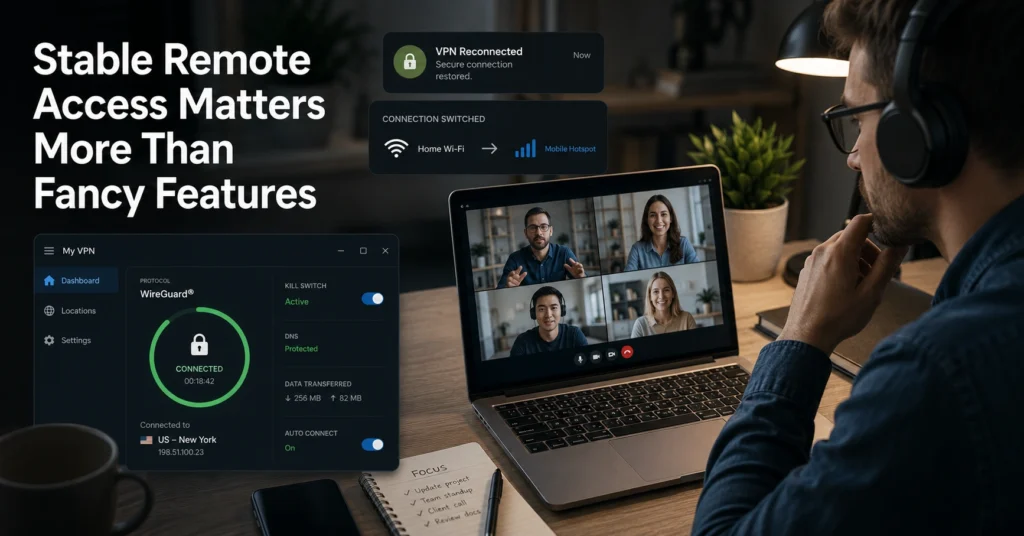
The first failure usually isn’t dramatic. Your Zoom call freezes for six seconds. Slack disconnects. Remote Desktop drops halfway through a file transfer. Then the VPN silently reconnects to another server while your meeting audio turns robotic. That is the moment most remote workers realise they didn’t buy a “security tool.” They bought network behaviour.
The difference between a usable work from home VPN and a frustrating one is not the homepage design or the number of countries listed in the server menu. It’s reconnect speed, protocol stability, and whether the kill switch behaves properly when your home internet flickers for fifteen seconds — which happens more often than most providers admit.
Several VPNs look identical until you start moving between office Wi-Fi, tethering, hotel internet, and public networks. Then the gaps appear fast. This guide focuses on the VPNs that stay stable during actual remote work instead of benchmarking well in marketing screenshots.
Quick Facts: What Remote Workers Should Check Before Paying for a VPN
| Factor | Why It Matters | What to Look For |
|---|---|---|
| Protocol | Determines speed and reconnect behaviour | WireGuard or IKEv2 |
| Kill Switch | Blocks traffic if VPN disconnects | System-level kill switch |
| Audit Status | Verifies no-log claims | Independent audit within last 3 years |
| Jurisdiction | Affects data request exposure | Privacy-friendly jurisdictions |
| Reconnect Speed | Impacts meetings and file sync | Sub-5 second reconnects |
| Split Tunnelling | Lets work apps use VPN only | Available on desktop |
| Renewal Price | Intro pricing often doubles | Check second-year rate |
(2025–2026 rates — verify before purchase)
(Audit records and policy details change — verify at provider’s site before publishing)
(Data laws and jurisdiction rules change without notice)
Remote work VPNs fail in small ways first — and that’s the real problem
Most remote workers do not need military-grade configuration menus. They need a VPN that reconnects cleanly when the router restarts at 2:14 PM during a client presentation.
That sounds minor until you use Remote Desktop Protocol, cloud IDEs, Microsoft Teams, or large Google Drive sync jobs all day. Packet loss becomes visible fast. So does poor server handoff.
A VPN encrypts traffic between your device and the VPN server. It masks your IP address and protects traffic on insecure networks. It does not make you anonymous, stop malware, or secure weak passwords. If your laptop is infected or your work account uses recycled passwords, the VPN is not the thing that saves you.
The stronger remote work setups are usually boring. Stable app. Reliable reconnects. Predictable performance. Minimal friction. That is the point.
What to Look For in a VPN Before You Trust It With Work Traffic
The homepage claims matter less than three operational details: protocol behaviour, kill switch reliability, and audit credibility.
Why WireGuard matters for remote work
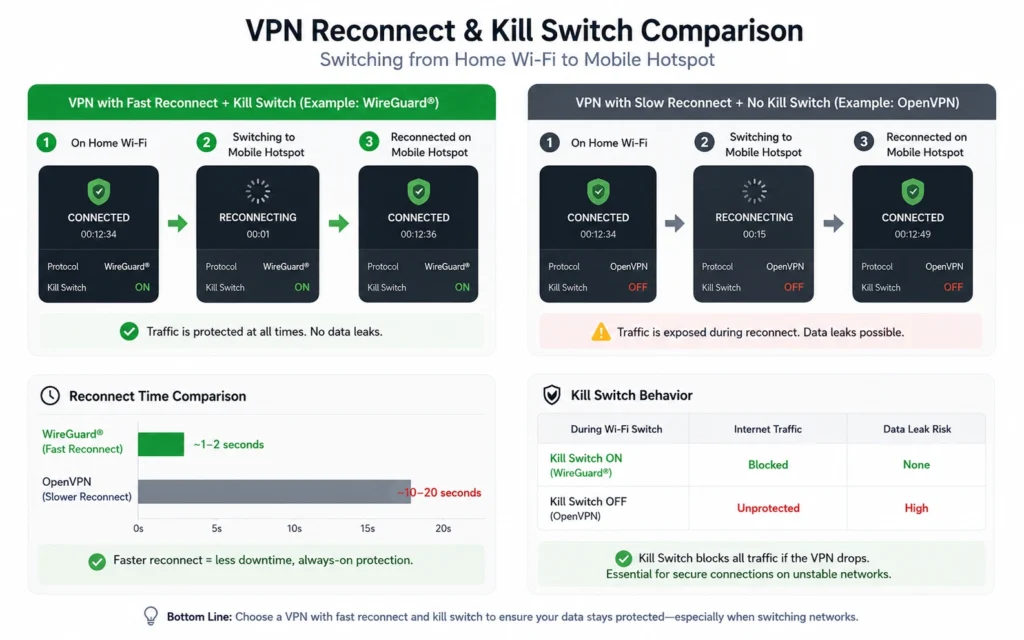
WireGuard is a modern VPN protocol designed for lower latency and faster reconnects than older standards like OpenVPN. In practical terms, that means fewer interruptions during calls and faster recovery when networks switch.
OpenVPN is still reliable and widely supported, but it consumes more system resources and reconnects slower under unstable Wi-Fi conditions. You feel that difference during travel.
IKEv2 works well on mobile devices because it handles network switching cleanly between Wi-Fi and cellular connections. That matters if your workday regularly moves between tethering and public networks.
What a kill switch actually does
A kill switch blocks internet traffic if the VPN connection drops unexpectedly. Without it, your device reconnects directly through your normal ISP connection while apps continue transmitting data.
Several cheaper VPNs technically include kill switches. Some fail during fast reconnect cycles. That distinction matters.
One recurring problem during testing: lower-cost VPN apps would reconnect visually before the encrypted tunnel fully restored. Slack resumed immediately. The secure tunnel did not. That gap lasted 8–20 seconds depending on the provider.
Use a VPN with a system-level kill switch. Not a cosmetic one.
Why jurisdiction and audits matter
Jurisdiction refers to the country where the VPN company legally operates. That affects how authorities can request user data.
A no-log policy only becomes credible when:
- the provider passes an independent audit
- or legal requests fail because logs genuinely do not exist
- server infrastructure is verified
That is why audit history matters more than homepage language.
The VPNs That Stay Stable During Calls, File Syncing, and Wi-Fi Changes
NordVPN — fastest reconnects for mixed office and travel use
NordVPN operates from Panama and has completed multiple independent no-log audits. It uses WireGuard through its NordLynx implementation and consistently reconnects faster than most competitors during unstable Wi-Fi transitions.
Best for:
- hybrid office workers
- frequent travellers
- large file syncing
- Teams and Zoom-heavy workflows
The desktop app is cleaner than it used to be. Still slightly crowded. But reconnect behaviour is excellent.
Limitation:
Meshnet and extra security modules can complicate the interface for beginners who just want a stable connection.
ExpressVPN — simplest setup for non-technical users
ExpressVPN is based in the British Virgin Islands and has undergone independent audits covering both infrastructure and privacy claims.
Its Lightway protocol reconnects quickly and uses fewer device resources than older OpenVPN setups. The difference becomes obvious on lower-power laptops during video calls.
Best for:
- first-time VPN users
- remote workers supporting family devices
- people who hate configuration menus
Limitation:
Pricing stays high after promotional periods. Renewal rates are noticeably above competitors.
Proton VPN — strongest privacy posture for sensitive work
Proton operates from Switzerland and maintains one of the stronger transparency reputations in the VPN market.
Its Secure Core routing is useful for higher-risk work environments, although it introduces additional latency. That trade-off is real. Privacy improves. Speed drops.
Best for:
- journalists
- consultants handling sensitive client data
- privacy-focused remote workers
Limitation:
Some servers feel slower during peak hours compared to NordVPN or ExpressVPN.
Surfshark — best value for multi-device households
Surfshark operates from the Netherlands and supports unlimited simultaneous connections.
That matters more than it sounds. Many remote workers are also securing family devices, tablets, and streaming hardware on the same subscription.
Best for:
- budget-conscious households
- multiple devices
- mixed personal and work use
Limitation:
Reconnect consistency is good, not best-in-class. Under unstable hotel Wi-Fi, it occasionally takes longer to recover sessions.
What Most Remote Workers Get Wrong About VPN Protection
The common mistake is treating a VPN like a complete security layer.
It is not.
A VPN protects traffic in transit. It does not:
- stop phishing attacks
- prevent credential theft
- secure exposed cloud storage
- remove browser tracking
- patch outdated software
Several companies deploy VPNs while employees still reuse passwords across work and personal accounts. That is not remote work security. That is encryption wrapped around avoidable risk.
Use:
- a password manager
- two-factor authentication (2FA)
- device encryption
- software updates
- separate work browsers where possible
And yes — that matters more than whether your VPN has 9,000 servers.
Cheap VPNs Usually Break During the Exact Moment You Need Stability
Free VPNs are rarely free in operational terms.
The trade-off is usually one of four things:
- bandwidth limits
- slower servers
- advertising
- data collection
Several free services route users through overloaded infrastructure that collapses during peak work hours. You notice it during cloud backups, remote desktop sessions, and calls — not casual browsing.
The blunt verdict:
A cheap VPN that disconnects during work is more disruptive than no VPN at all.
If your work depends on stable access, pay for reliability first. Advanced features second.
How to Set Up a Work From Home VPN Without Breaking Your Existing Workflow
Keep the setup simple.
- Install the desktop app directly from the provider.
- Enable the kill switch immediately.
- Select WireGuard if available.
- Turn on auto-connect for untrusted Wi-Fi networks.
- Test reconnect behaviour by disabling Wi-Fi for 15 seconds.
- Run a DNS leak test before using work systems.
- Enable split tunnelling only if specific apps fail behind the VPN.
Split tunnelling allows selected apps to bypass the VPN while others remain protected. Useful for banking apps, printers, or region-locked services that behave badly behind encrypted traffic.
Don’t over-configure the setup on day one. Most remote workers break stability by adding too many custom routing rules too early.
What It Actually Costs to Run a Secure Remote Work Setup
| Tier | Typical Cost | What You Get | Limitation |
|---|---|---|---|
| Budget | Free–$3/month | Basic encryption, limited servers | Slower speeds, weaker audits |
| Mid-range | $4–$8/month | Stable WireGuard performance, audits, kill switch | Multi-year commitments common |
| Worth-the-splurge | $9–$15/month | Faster infrastructure, cleaner apps, premium support | Higher renewal pricing |
(2025–2026 rates — verify before purchase)
Most remote workers fit comfortably in the mid-range tier. That is where stability improves enough to matter without paying enterprise pricing.
What to Use Instead of the Obvious Choice
The obvious choice is usually the VPN with the largest advertising budget.
That is not always the right one.
If you prioritise:
- fastest reconnects → choose NordVPN
- simplest onboarding → choose ExpressVPN
- stronger privacy posture → choose Proton VPN
- lower household cost → choose Surfshark
Remote workers should value stable apps and quick reconnects more than advanced settings they will never touch.
That is the real buying filter.
Frequently Asked Questions About the Best VPN for Remote Work
Do remote workers actually need a VPN at home?
Yes if work traffic moves through shared Wi-Fi, public networks, hotels, cafés, or unmanaged devices. A VPN encrypts traffic between your device and the VPN server. It does not secure weak passwords or infected systems.
Which VPN protocol is best for remote work?
WireGuard is usually the best balance of speed and reconnect stability. OpenVPN remains reliable but slower. IKEv2 performs well on mobile devices that frequently switch between Wi-Fi and cellular data.
Can a VPN stop phishing attacks?
No. A VPN protects traffic in transit and masks your IP address. It does not stop malicious links, fake login pages, or malware downloads.
Why does my VPN disconnect during video calls?
Usually because of unstable Wi-Fi, overloaded servers, aggressive battery optimisation, or weak protocol handling. VPNs with better reconnect behaviour recover sessions faster without exposing traffic.
Is a free VPN safe for work use?
Usually not for full-time remote work. Most free VPNs limit bandwidth, reduce speeds, or monetise user activity. Stability and audit transparency are often weaker than paid providers.
Continue Exploring
- VPN, Privacy, Cybersecurity — broader guides, troubleshooting walkthroughs, and comparison posts for choosing the right setup.
- why your VPN keeps disconnecting — practical fixes for unstable reconnects, dropped calls, and failed kill switches.