The best VPN for families is the one that covers every device without forcing each family member to manage a separate subscription. Surfshark is the simplest choice for most households: unlimited simultaneous connections, apps that don’t require tech skills, and a single account that protects phones, tablets, laptops, and smart TVs at once.
NordVPN is the better pick if you want independently audited no-log proof and slightly stronger streaming performance, while ExpressVPN is worth the premium only if you need the easiest router setup and don’t mind paying more per month (2025–2026 rates — verify before purchase).
A VPN for families masks your IP and encrypts traffic on each device, but it does not make your kids anonymous, block inappropriate content, or protect against malware. That’s the common misconception that wastes money: buying a VPN expecting parental control. If you need content filtering, pairing a simple VPN with dedicated parental control software is the actual working setup.
This post compares multi-device limits, real prices, audit status, kill switch behavior, and setup time for families. You’ll get a direct recommendation, a step-by-step setup sequence under 20 minutes, and a named alternative for households that value convenience over power-user settings.
VPN, Privacy, Cybersecurity — this category links to deeper comparisons and troubleshooting for when a VPN drops or streaming fails.
Quick verdict — which family VPN to choose now
Surfshark is the best VPN for families that want unlimited devices and the simplest setup.
NordVPN is the best choice if you want an independently audited no-log policy and better streaming reliability.
ExpressVPN is only worth the extra cost if you need the easiest router configuration and don’t mind a higher renewal price.
The honest negative: family use is about convenience and device count, not advanced protocol tweaks. If you’re a power-user who wants to fine-tune WireGuard parameters, split-tunneling rules for every app, and custom DNS per device, most family plans will feel limiting. In that case, a single-account, unlimited-device setup is still better, but you should be prepared to configure the router yourself and live with app-level constraints.
For most households, the decision is simple:
- Choose Surfshark if you want unlimited devices and the easiest apps.
- Choose NordVPN if audits and streaming matter more than the lowest price.
- Choose ExpressVPN only if you need the simplest router setup and accept a higher cost.
Multi-device limits that change the decision
Most VPN services let you connect multiple devices with one account, but the limit is where the real difference shows.
| Provider | Simultaneous connections | Audit status | Jurisdiction | Protocol default | Kill switch | Best for | Limitation |
|---|---|---|---|---|---|---|---|
| Surfshark | Unlimited | Independent audit (2022) | British Virgin Islands | WireGuard | Yes, always on | Families with many devices | Streaming can be spotty on some servers |
| NordVPN | 10 | Independent audit (2023, 2024) | Panama | WireGuard | Yes, reliable | Streaming + privacy proof | More expensive on renewal |
| ExpressVPN | 14 | Independent audit (2023) | British Virgin Islands | Lightway (proprietary) | Yes, very reliable | Simplest router setup | Highest price, renewal jump |
| Proton VPN | 10 | Independent audit (2023) | Switzerland | WireGuard | Yes | Privacy-focused families | Free tier is very limited |
Data points:
- Surfshark: unlimited devices, independent audit in 2022, BVI jurisdiction, WireGuard default, always-on kill switch.
- NordVPN: 10 simultaneous connections, audits in 2023 and 2024, Panama jurisdiction, WireGuard default, reliable kill switch.
- ExpressVPN: 14 simultaneous connections, audit in 2023, BVI jurisdiction, Lightway protocol, very reliable kill switch.
- Proton VPN: 10 devices, audit in 2023, Switzerland jurisdiction, WireGuard default, strong kill switch.
The practical consequence: if you have more than 10 devices that might be online at once (phones, tablets, laptops, smart TVs, gaming consoles, IoT), Surfshark’s unlimited connections remove the need to manage which device gets disconnected.
With NordVPN or ExpressVPN, you’ll hit the limit during heavy household usage unless you set the VPN on your router, which protects every device at the network level and bypasses the per-device limit.
Router-based setup is the real multi-device solution for large households. When the VPN runs on the router, all traffic from every device on that network goes through the tunnel, and you only use one “connection slot” regardless of how many devices are active.
How to set up a family VPN in under 20 minutes
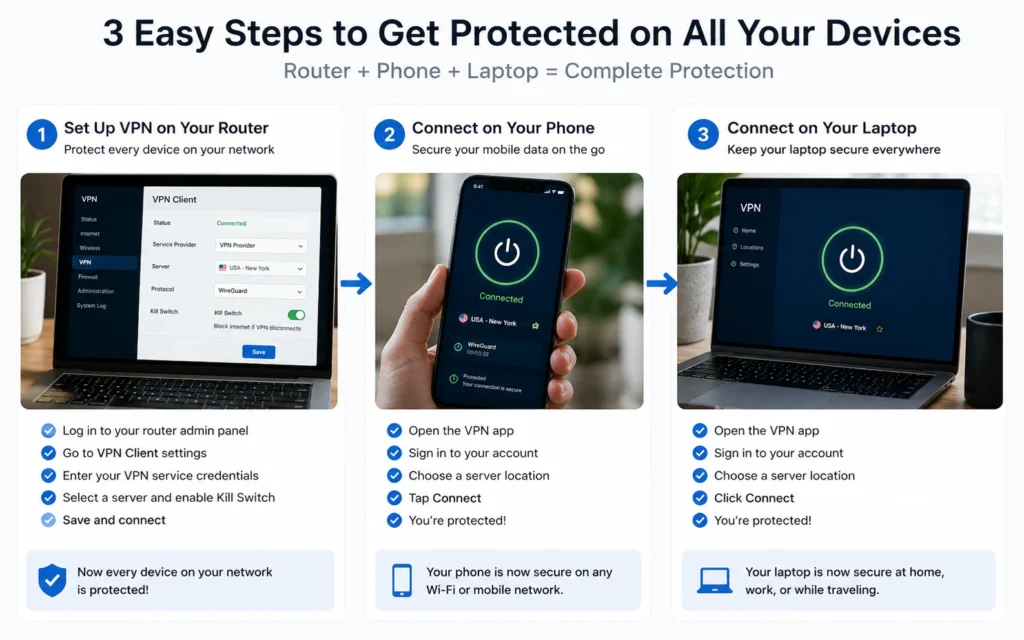
You don’t need to become a network engineer to protect a family. The fastest, most reliable setup uses the VPN app on each device, not a custom router firmware.
Direct answer: Install the VPN on each device, sign in with the same account, turn on the kill switch, and test the connection. Total time: 15–20 minutes for 3–5 devices.
You need:
- One VPN account with enough simultaneous connections (Surfshark unlimited, NordVPN 10, ExpressVPN 14)
- Phones, tablets, laptops, and at least one smart TV or streaming device
- The provider’s app installed on each device
Step 1: Create one account and choose a plan that covers your household.
Use a 2-year plan if you want the lowest monthly cost, but note the renewal rate. (2025–2026 rates — verify before purchase).
Step 2: Download the VPN app on each device.
Install on: iPhone/iPad, Android, Windows, macOS, Amazon Fire TV, Roku, or Chrome browser extension.
Step 3: Sign in with the same account on every device.
Use the same email and password. Don’t create separate accounts for each family member.
Step 4: Turn on the kill switch on each device.
In the app settings, enable “Kill Switch” or “Network Lock.” This blocks internet if the VPN disconnects, so your real IP isn’t exposed.
Step 5: Connect to a server near you for speed, or in another country for streaming.
Start with a nearby server. Test speed and streaming. If a streaming service doesn’t work, switch to a server labeled “Streaming” or “Optimized.”
Step 6: Test that the VPN is working.
Visit a site like ipleak.net and check that your IP address and DNS are from the VPN, not your ISP. If your real IP appears, the kill switch didn’t trigger or DNS leaked.
If you want to protect every device without installing apps, set the VPN on your router. This is more complex but removes per-device limits and protects smart TVs and IoT devices automatically.
VPN, Privacy, Cybersecurity — this category includes troubleshooting posts if your VPN keeps disconnecting or streaming stops working.
Plans, prices, and renewal traps (2025–2026 rates — verify before purchase)
Promotional first-year prices are common, but the renewal rate is what you’ll actually pay after the initial term. Here’s the real cost structure for family-friendly VPNs.
| Tier | Price range | What you get | Example provider | Protection level |
|---|---|---|---|---|
| Budget | <$3/month | Unlimited or high device count, WireGuard, kill switch, basic streaming | Surfshark (2-year plan) | Good for most families; audit exists |
| Mid-range | $3–$8/month | Stronger streaming, recent audits, better support, reliable kill switch | NordVPN (2-year plan) | Strong privacy + streaming proof |
| Worth-the-splurge | >$8/month | Easiest router setup, most reliable connections, premium support | ExpressVPN (1-year plan) | Best convenience, highest cost |
Data points:
- Surfshark: budget tier, unlimited devices, audit in 2022, WireGuard default, kill switch always on.
- NordVPN: mid-range tier, 10 devices, audits in 2023 and 2024, WireGuard default, reliable kill switch.
- ExpressVPN: worth-the-splurge tier, 14 devices, audit in 2023, Lightway protocol, very reliable kill switch.
Renewal reality:
- Most 2-year plans drop to a higher monthly rate after the initial term.
- Always check the renewal price before buying.
- Write the renewal rate down before you click “buy.”
A free VPN might look attractive for a family on a tight budget, but the trade-off is specific: data logging, bandwidth limits, slower speeds, or monetization of usage data. Free VPNs often log exactly what they claim not to, and they may sell browsing data to fund the service. That’s the actual starting point for privacy.
What this VPN does not protect your family against
A VPN is not full anonymity, and it is not parental control. It masks your IP and encrypts traffic, but it does not:
- Block inappropriate content or websites
- Monitor what your kids do online
- Protect against malware, phishing, or compromised accounts
- Secure your accounts if passwords are weak or 2FA is off
Your browser knows your location, your ISP sells browsing history in several jurisdictions, and most free VPNs log exactly what they claim not to. That’s the actual starting point. A VPN is one layer, not the entire stack.
If you need content filtering, use dedicated parental control tools alongside the VPN. If you need account security, use a password manager and enable 2FA on every important service. That’s the working combination.
What to use instead of the obvious choice
The obvious choice for many families is the cheapest VPN with the most marketing. That’s often the wrong move. If convenience is the priority, pick a provider with simple apps and unlimited or high device limits, not the one with the most features you won’t use.
Households should pick for shared convenience, not power-user settings. For most families, Surfshark is the better choice over NordVPN if you want unlimited devices and the simplest apps.
If you’re a power-user who wants protocol fine-tuning, split-tunneling for every app, and custom DNS per device, a single-account, unlimited-device setup is still better, but you should be prepared to configure the router yourself and live with app-level constraints.
An honest alternative: if your main goal is parental control and content filtering, start with a dedicated parental control service and add a mid-range VPN for privacy. Don’t expect a VPN to do both jobs well.
Frequently Asked Questions About Best VPN for Families
What is the best VPN for families with multiple devices?
Surfshark is the best VPN for families that need unlimited simultaneous connections and simple apps. It covers every device in the house under one account without extra per-device fees (2025–2026 rates — verify before purchase).
How many devices can a family VPN support at once?
It depends on the provider: Surfshark allows unlimited devices, NordVPN allows 10 simultaneous connections, and ExpressVPN allows 14. Router-based setup removes the limit entirely for home networks.
Do I need a separate VPN for each family member?
No. One account with enough simultaneous connections covers the whole household. Install the app on each device and sign in with the same account, or set the VPN on your home router so every device is protected automatically.
Is a family VPN safe for kids and parents?
A VPN encrypts traffic and masks your IP, but it is not parental control. It does not block inappropriate content or monitor activity. Use a VPN for privacy and pair it with dedicated parental control tools if you need content filtering.
Continue Exploring
- VPN, Privacy, Cybersecurity — this category links to deeper comparisons and troubleshooting for when a VPN drops or streaming fails.
- VPN comparisons — compare NordVPN, Surfshark, and ExpressVPN side-by-side with real speed and streaming tests.