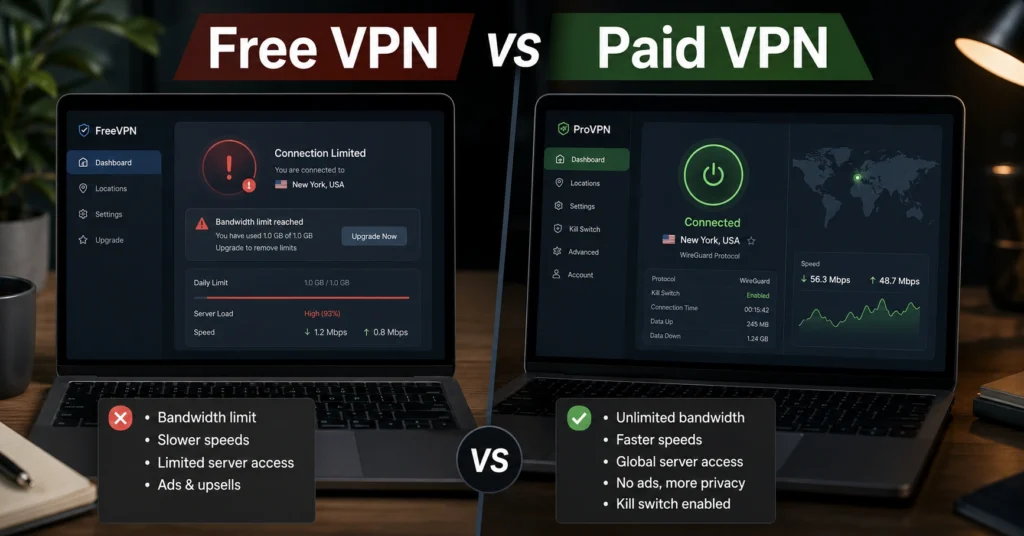
Quick verdict — most free VPNs are limited by design
| Provider Type | Price | Jurisdiction | Audit | Protocol | Best For | Limitation | Verdict |
|---|---|---|---|---|---|---|---|
| Free VPN | $0 | Often unclear or mixed | Rare | Usually limited WireGuard/OpenVPN support | Occasional browsing | Data caps, slower speeds, weaker transparency | Acceptable only for narrow use |
| Paid VPN | $3–$12/month | Usually disclosed | Common among top providers | WireGuard, OpenVPN, IKEv2 | Streaming, travel, privacy, remote work | Subscription cost | Safer default for most people |
The first thing most people notice about a free VPN is the price. The second thing they notice is the limit they hit three days later.
Sometimes it is bandwidth. Sometimes the server list disappears behind an upgrade screen. Sometimes Netflix stops loading halfway through a trip because the IP range was already blocked. And sometimes the connection drops without the kill switch triggering — which defeats the entire point of using a VPN in the first place.
That is the real free vpn vs paid vpn comparison. The difference is not the homepage design. It is where the provider moves the cost.
A VPN encrypts your traffic and masks your IP address. It does not make you anonymous, stop malware, or secure compromised accounts. That misconception still drives a lot of bad buying decisions.
(Audit records and policy details change — verify at provider’s site before publishing)
Free VPN vs paid VPN comparison table
| Feature | Free VPN | Paid VPN |
|---|---|---|
| Typical Monthly Cost | $0 | $3–$12/month (2025–2026 rates — verify before purchase) |
| Data Limits | Often 500MB–10GB/month | Usually unlimited |
| Speed Consistency | Frequently throttled | Generally stable |
| Streaming Support | Weak or blocked | Usually maintained |
| Kill Switch Reliability | Inconsistent | Common on quality providers |
| Audit Availability | Rare | Common among reputable services |
| Protocol Support | Limited | WireGuard, OpenVPN, IKEv2 |
| Server Selection | Small | Large global networks |
| Logging Transparency | Often vague | Better documented |
| Best Fit | Temporary light browsing | Daily privacy and reliability |
WireGuard is a newer VPN protocol designed for speed and efficiency. OpenVPN is older, slower in many cases, but still heavily trusted. IKEv2 reconnects quickly on mobile devices and works well when switching between Wi-Fi and cellular networks.
That protocol difference matters more than most comparison pages admit. A free VPN using overloaded OpenVPN servers can feel broken on hotel Wi-Fi. A paid provider running WireGuard properly often feels close to a normal broadband connection.
What free VPNs are actually like after a week of use
Most free VPNs work well enough for the first ten minutes. That is not the real test.
The real test is whether you still trust the service after using it across different networks, devices, and failure states. Public Wi-Fi. Airport connections. Weak hotel routers. Streaming attempts. A dropped connection during a file upload.
This is where many free VPNs start exposing the tradeoff.
Some log more connection metadata than users realise. Some inject ads. Some throttle speeds after a certain usage threshold. Others reserve their faster servers for paid subscribers while routing free users through overloaded nodes that turn 4K streaming into a buffering loop.
And then there is jurisdiction.
A VPN jurisdiction refers to the country where the company legally operates. That affects how user data requests, logging requirements, and legal disclosures work. Providers based in privacy-friendly jurisdictions like Panama or the British Virgin Islands are usually structured differently from providers operating under heavier data retention environments.
(Data laws and jurisdiction rules change without notice)
The strongest free VPNs today usually come from paid providers offering limited free tiers — not from standalone “100% free unlimited VPN” brands. That distinction matters.
The blunt verdict: if a VPN claims unlimited bandwidth, zero cost, no ads, and no monetisation model, you should ask what is paying for the infrastructure instead.
What paid VPNs do differently — beyond just speed
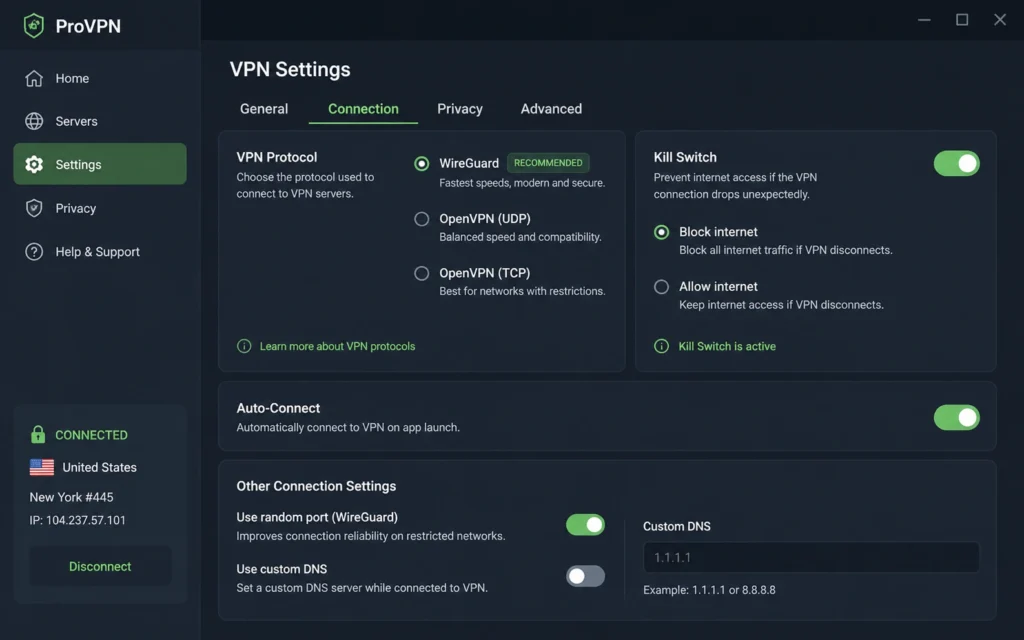
The obvious difference is performance. The less obvious difference is operational maturity.
A good paid VPN spends money on audits, infrastructure, protocol development, streaming IP rotation, DNS leak prevention, and reliable kill switch behaviour. Those are not marketing extras. They are the product.
A kill switch blocks internet traffic if the VPN connection fails unexpectedly. Without it, your real IP address becomes visible during the disconnect window. Some cheaper VPN apps still fail this test under unstable connections — especially on mobile devices.
The difference becomes obvious during travel.
One unstable café network is enough to expose weak VPN apps. You reconnect. The tunnel drops. Traffic leaks for thirty seconds. Then the VPN reconnects silently in the background while your real connection was already exposed.
The providers worth paying for usually recover cleanly.
Independent audits matter here too. Providers like NordVPN, ExpressVPN, and Proton VPN have published third-party audit results covering infrastructure or no-log claims. That does not make them flawless. It does make their privacy claims more credible than a landing page promise with no external verification.
Why “no-log” means very little without an audit
“No-log VPN” became marketing wallpaper years ago.
The phrase sounds reassuring until you realise many providers define logging differently. Some mean no browsing logs. Others still collect connection timestamps, bandwidth usage, device identifiers, or session diagnostics.
An independent audit tests whether the provider’s infrastructure and operational claims match reality. That matters because users cannot inspect VPN backend systems themselves.
And some providers have already been tested in real-world legal situations.
Several well-known VPN companies have faced server seizures or data requests where little usable customer information was produced. That carries more weight than a homepage badge.
Still, audits are not permanent guarantees. Infrastructure changes. Ownership changes. Policies change.
(Audit records and policy details change — verify at provider’s site before publishing)
The differences that actually change the decision
Most comparison pages obsess over server counts. That is rarely the deciding factor for normal users.
These are the differences that usually matter instead:
- Whether the VPN survives unstable connections without leaking traffic
- Whether streaming still works six months later
- Whether WireGuard is available across all apps
- Whether split tunnelling works properly on your platform
- Whether renewal pricing doubles after year one
- Whether the company has undergone independent audits
- Whether customer support exists when login recovery breaks during travel
Split tunnelling lets some apps use the VPN while others bypass it. Useful in theory. Messy in practice. Several VPN apps implement it differently across Windows, macOS, Android, and iOS.
That inconsistency catches people off guard constantly.
Choose a free VPN only if your use case is narrow
A free VPN can make sense for:
- occasional airport browsing
- bypassing light regional restrictions
- temporary privacy on public Wi-Fi
- testing whether you even need a VPN
That is about where the recommendation stops.
If your priority is torrenting, streaming, remote work, or daily privacy protection, free services become frustrating quickly. The limitations appear exactly when reliability matters most.
The honest negative: many paid VPNs are also oversold. Some push huge server numbers while delivering mediocre speeds and weak applications. Paying alone does not guarantee quality.
A safer approach is using a limited free tier from a reputable paid provider rather than trusting an unknown unlimited free VPN.
Choose a paid VPN if reliability matters even once
The strongest argument for a paid VPN is not speed. It is predictability.
You stop thinking about whether the server will disconnect mid-call. You stop juggling data limits. You stop wondering whether the provider is monetising usage data behind vague policy language.
That matters for:
- remote workers
- frequent travellers
- people using hotel or airport Wi-Fi regularly
- streaming across regions
- privacy-conscious users who actually want audited infrastructure
And there is another practical reality here: the annual cost of a decent VPN is often lower than a single month of cloud storage or streaming subscriptions.
That does not make every paid VPN worthwhile. Some still lock core features behind higher plans or increase renewal pricing aggressively after promotional periods.
(2025–2026 rates — verify before purchase)
Cost comparison: what you actually pay for
| Tier | Typical Cost | What You Get | Biggest Compromise |
|---|---|---|---|
| Budget | Free–$3/month | Basic encryption, limited servers | Data caps or slower speeds |
| Mid-range | $3–$8/month | Better apps, WireGuard, audits, streaming support | Renewal pricing jumps |
| Worth-the-splurge | $8+/month | Premium infrastructure, business features, wider device support | Overkill for casual users |
The surprising part is how compressed the pricing has become.
Many respected VPNs now discount long-term plans aggressively enough that the gap between “free” and “reliable paid” is smaller than people expect. The bigger cost difference is not money. It is trust.
Final recommendation: pay for privacy if privacy is the point
If you only need temporary protection on public Wi-Fi once or twice a month, a reputable free VPN tier is probably enough.
If you expect consistency, streaming access, reliable kill switches, audited no-log claims, and stable WireGuard performance, paid VPNs are the safer default.
That is the actual decision.
Free VPNs are not automatically dangerous because they cost nothing. They become risky when the provider hides how the business survives financially. Infrastructure costs money. Server maintenance costs money. Audits cost money. If the customer is not paying directly, the provider usually recovers the cost somewhere else.
And that “somewhere else” is often the real product.
VPN, Privacy, Cybersecurity covers deeper comparisons, troubleshooting guides, and use-case VPN recommendations if you are deciding what to use next.
Frequently Asked Questions About Free VPN vs Paid VPN
Are free VPNs safe to use?
Some are reasonably safe for light browsing and temporary use. The safer options usually come from established paid VPN companies offering restricted free tiers. Completely unlimited free VPNs deserve more scrutiny because the infrastructure still has to be funded somehow.
What does a paid VPN actually protect?
A paid VPN encrypts your internet traffic and hides your IP address from your ISP, public networks, and many websites. It does not protect against phishing attacks, malware downloads, or weak passwords. You still need basic account security and 2FA.
Why are some VPNs so cheap on long-term plans?
Most providers discount aggressively during the first term, then raise renewal pricing later. A VPN advertised at $2.99/month often renews at a much higher annual rate after the initial contract period.
Is WireGuard always better than OpenVPN?
Usually for speed, yes. WireGuard is lighter and faster on most modern devices. OpenVPN still has compatibility advantages and remains widely trusted for older systems or stricter enterprise environments.
Should you trust a VPN that says “no logs”?
Only after checking whether independent audits exist. “No logs” without external verification is still a marketing claim. Audit history, jurisdiction, and real-world legal cases matter more than slogans.
Continue Exploring
- VPN, Privacy, Cybersecurity is the broader comparison and troubleshooting hub covering VPN use cases, privacy tools, and security buying decisions beyond basic free vs paid comparisons.
- VPN, Privacy, Cybersecurity also includes deeper guidance on streaming VPNs, remote work protection, and privacy-first browsing setups where protocol choice and kill switch reliability matter more than headline pricing.