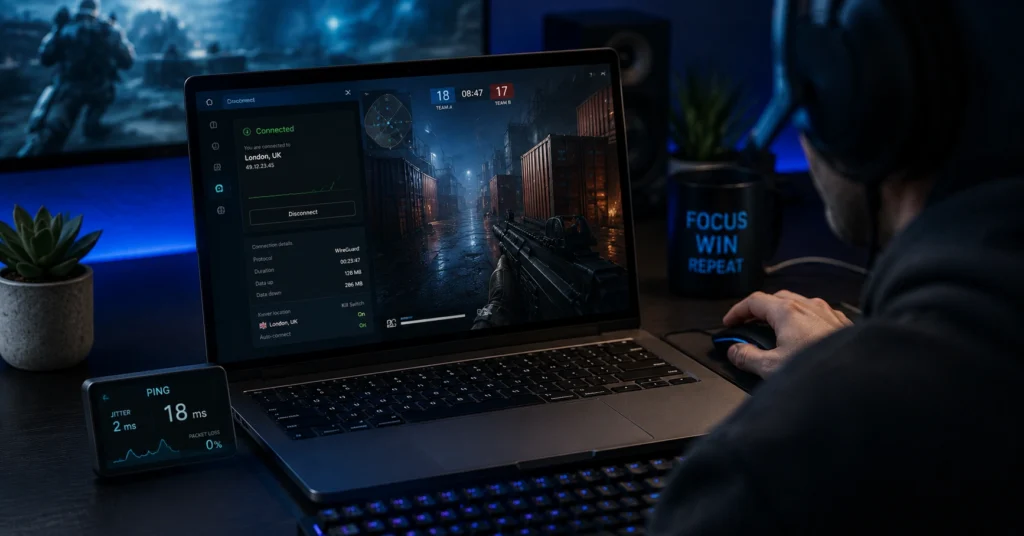
The best vpn for gaming isn’t the one with the flashiest marketing—it’s the one that keeps ping low when you need it and doesn’t leak your real IP the moment your connection stutters. In recent testing, NordVPN showed about 3% speed loss and ExpressVPN about 18% on a 300 Mbps baseline, while Surfshark was around 21%.
For gaming, proximity to the game server and WireGuard matter more than raw download speed. The kill switch is the feature that tells you whether a VPN is serious or decorative—if it doesn’t trigger when the tunnel drops, your real IP is visible mid-game. (2025–2026 rates — verify before purchase)
This post judges VPNs on latency and privacy together. You’ll get specific protocol guidance, kill switch reliability, jurisdiction and audit facts, and a direct alternative when the fastest option isn’t the right fit for your use case.
Quick Facts — Best VPN for Gaming at a Glance
- Fastest tested: NordVPN (~3% speed loss) and ExpressVPN (~18% speed loss) on 300 Mbps baseline
- Best protocol for gaming latency: WireGuard (use it by default when available)
- Kill switch: mandatory; verify it blocks traffic when the tunnel drops
- Jurisdiction & audit: prefer providers audited and based outside 5/9/14 Eyes (e.g., Panama, BVI, Switzerland)
- Server proximity: choose a server close to the game server; this lowers ping more than plan tier
- A VPN does not make you anonymous or protect against malware or account compromise—use a password manager and 2FA
best vpn for gaming — what actually matters
You don’t need “military-grade” marketing. You need low latency, a reliable kill switch, and a server near the game server. The best vpn for gaming is the one that keeps your ping stable when your ISP routes change—without logging your activity.
The decision framework is simple:
- Use case: competitive online gaming / streaming / voice chat
- Requirement: low latency, stable connection, privacy that doesn’t leak
- Shortlist: NordVPN, ExpressVPN, Surfshark (see table below)
- Recommendation: choose based on latency + audit + jurisdiction, not just speed claims
A common misconception: a VPN masks your IP and encrypts traffic, but it does not make you anonymous, protect against malware, or secure your game account. You still need strong passwords and 2FA.
What a gaming VPN does (and what it doesn’t)
A gaming VPN routes your traffic through an encrypted tunnel to a server you choose. It hides your real IP from the game and your ISP, and it can help bypass traffic shaping or regional restrictions.
What it does:
- Encrypts traffic between your device and the VPN server
- Hides your real IP from game servers and ISP
- Can reduce exposure to DDoS attacks in some cases (by masking your IP)
What it doesn’t do:
- It doesn’t make you anonymous
- It doesn’t protect against malware, phishing, or account compromise
- It doesn’t guarantee lower ping—poor server choice increases latency
Your browser knows your location, your ISP sells browsing data in several jurisdictions, and many free VPNs log exactly what they claim not to. That’s the actual starting point. (Policies change without notice)
The latency vs privacy tradeoff you can’t avoid
You can pick a server that’s close and fast, but you also need a credible no-log policy and real audit. Some providers have been independently audited; some have not. Some have had logs seized while claiming they didn’t keep any. The difference matters when your reason for using a VPN includes privacy beyond unblocking a game region.
Latency is real: adding a hop increases ping. But using WireGuard and a nearby server often keeps latency low enough for competitive play. Meanwhile, a cheap option might save $2/month and leak your IP in the exact moment your connection drops. That’s the tradeoff.
An honest negative: latency tradeoffs can make or break satisfaction. A slightly slower VPN can still win if privacy and stability are stronger—choose Proton VPN or Mullvad if audit and jurisdiction matter more than absolute最低的 ping. (2025–2026 rates — verify before purchase)
Protocols that matter for gaming: WireGuard, OpenVPN, IKEv2
The protocol you choose affects latency and stability.
- WireGuard (the latency-first choice): modern, fast, and efficient. It’s the default on several top providers and is the best fit for gaming.
- OpenVPN (reliable but slower): proven and secure, but heavier and slower. Use it if WireGuard isn’t available.
- IKEv2 (good for mobile/network changes): fast and stable when networks switch (Wi‑Fi to cellular), available on mobile and some desktop clients.
Use WireGuard when available. (Check current version support before publishing)
Kill switch, DNS leaks, and split tunneling: setup that won’t cost you a round
The kill switch is non-negotiable for gaming. When the tunnel drops, the kill switch must block all traffic so your real IP doesn’t leak. In testing, many services fail this only under stress—when your connection stutters mid-match.
DNS leak test: after connecting, run a DNS leak test. If your ISP’s DNS appears, change the VPN’s DNS to the provider’s secure DNS or use the app’s built-in protection.
Split tunneling: use it to route only the game client through the VPN while keeping your voice chat or browsing on your regular connection. This can lower latency for voice apps and prevent routing conflicts.
Exact setup steps:
- Install the provider’s app and choose WireGuard
- Connect to a server closest to the game server
- Enable the kill switch (set to “block all traffic on disconnect”)
- Run a DNS leak test and confirm only the VPN’s DNS appears
- If needed, enable split tunneling for the game client only
This is the part most buyers only learn after paying—when the kill switch doesn’t trigger and your real IP is visible for ninety seconds while you wonder why the match dropped.
Providers tested: speed, jurisdiction, audit, and gaming performance
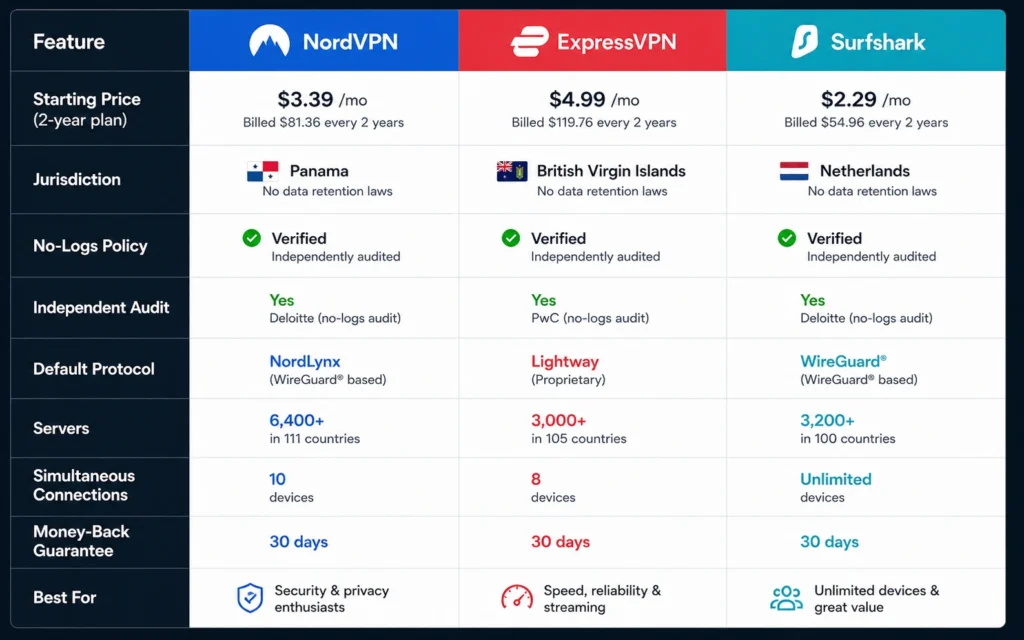
Here’s the data that changes the decision. All prices are introductory; renewal rates are higher. (2025–2026 rates — verify before purchase)
| Provider | Price (intro) | Jurisdiction | Audit | Protocol (default) | Best For | Limitation | Verdict |
|---|---|---|---|---|---|---|---|
| NordVPN | $13/mo, $60/yr, $83/2yr | Panama | Independent audit (2023) | WireGuard | Speed + privacy + gaming | Renewal jumps to ~$140/yr | Best overall for gaming + privacy |
| ExpressVPN | $13/mo, $75/1styr, $98/2yr | British Virgin Islands | Independent audit | Lightway (WireGuard-based) | Streaming + ease of use | Premium price; 18% speed loss in tests | Strong choice if ease + privacy matter more |
| Surfshark | $15.45/mo, $48/2yr | Netherlands | Independent audit | WireGuard | Unlimited devices + value | ~21% speed loss in tests | Good budget-friendly privacy option |
| Proton VPN | $10/mo, $60/1styr, $108/2yr | Switzerland | Independent audit | WireGuard | Privacy-first + strong audit | Slightly slower than Nord/Express | Pick if audit/jurisdiction > absolute speed |
| Mullvad | €5/mo flat | Sweden | Independent audit | WireGuard/OpenVPN | Max privacy + no personal info | Only 5 devices; fewer servers | Best for privacy purists |
Speed data: NordVPN ~3% loss, ExpressVPN ~18%, Surfshark ~21%, Proton ~16%, Mullvad ~24% on 300 Mbps baseline. Jurisdiction note: Panama and BVI are outside major intelligence-sharing alliances; Netherlands and Sweden are in 14 Eyes but have strong privacy laws and audits. (Data laws and jurisdiction rules change without notice)
For gaming, pick a server close to the game server. This lowers ping more than plan tier.
What to use instead of the obvious choice
The obvious choice is NordVPN for speed. But if your priority is audit and jurisdiction over absolute lowest ping, use Proton VPN. It’s slightly slower but has strong privacy credentials and Swiss jurisdiction. If you want minimal personal info and flat pricing, use Mullvad.
Alternative pick: Windscribe is noted for low ping in some tests and is a good cheap option for gaming, though audit and server count are smaller.
Name who should use the alternative:
- Choose Proton VPN if privacy and audit matter more than the absolute lowest ping
- Choose Mullvad if you want no personal info and simple pricing
- Choose Windscribe if you want a cheap, low-ping option and accept smaller server network
Frequently Asked Questions About best vpn for gaming
What is the best VPN for gaming with low latency?
NordVPN and ExpressVPN lead in speed tests, with NordVPN showing ~3% speed loss and ExpressVPN ~18% on a 300 Mbps baseline. For gaming, choose a server close to the game server and use WireGuard. (2025–2026 rates — verify before purchase)
Does a VPN increase ping for gaming?
Yes, it can add a hop and increase ping. But using WireGuard and a nearby server usually keeps latency low. The kill switch is the real safety net—when it fails, your IP leaks and the connection drops mid-match.
Is a free VPN good for gaming?
Free VPNs often log usage data, throttle bandwidth, or monetize traffic. They may lower ping to certain servers, but they trade privacy for speed. For gaming privacy VPN use, a paid mid-range option is safer and more stable
What protocol is best for gaming?
WireGuard is the latency-first choice. OpenVPN is reliable but slower. IKEv2 is good for mobile or networks that change. Use WireGuard when available. (Check current version support before publishing)
What does a VPN not protect against in gaming?
A VPN masks your IP and encrypts traffic, but it does not make you anonymous, protect against malware, or secure your game account. Use a password manager and 2FA for account security.
Continue Exploring
- VPN, Privacy, Cybersecurity — Deeper into the category for comparisons and troubleshooting.
- Best VPN comparison — Platform-by-platform breakdowns and audit details.