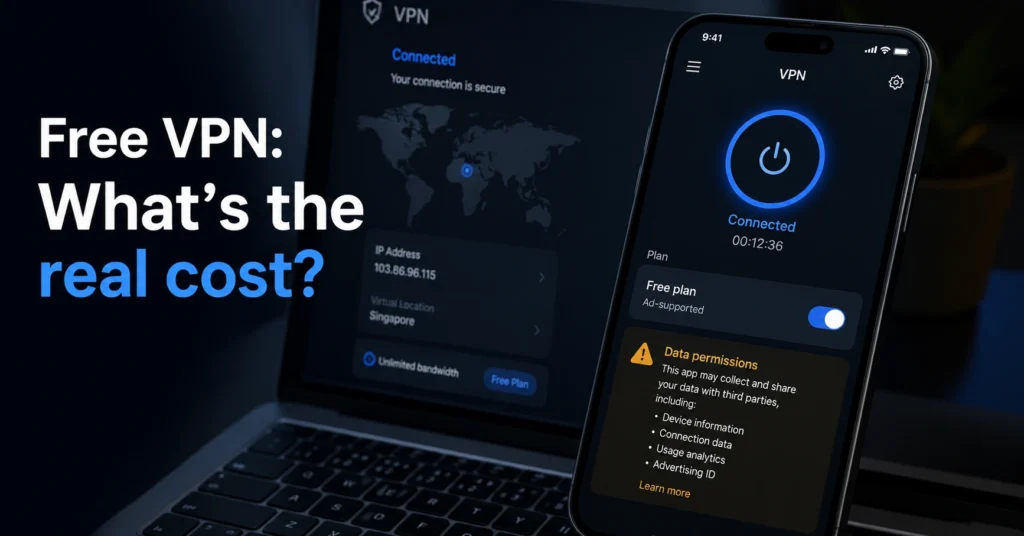
free VPNs sell your data? Yes—many do, and many monetize your browsing data, push intrusive ads, or request excessive permissions that go far beyond what a VPN needs. A 2025 study of 800 free VPN apps found 65–66% exhibited risky behaviors, and a quarter lacked any valid privacy manifest—developers’ declarations of how they use sensitive data—making data flows opaque and enabling profiling or monetization.
A paid plan from an audited provider is usually the cleaner privacy choice. This post explains the real tradeoff, the exact monetization paths, and what to use instead.
Quick Facts: What You Need to Know Before Choosing a Free VPN
- 65–66% of free VPN apps show critical privacy risks (risky APIs, screenshot capture, insecure activity launch)
- 25% of tested free VPNs have no valid privacy manifest—no developer-declared data uses
- 40%+ request excessive permissions (e.g., LOCATION_ALWAYS on iOS; AUTHENTICATE_ACCOUNTS on Android)
- Many free VPNs monetize via selling browsing data, intrusive ads, or sponsored redirects
- A VPN masks your IP and encrypts traffic; it does not make you anonymous, protect against malware, or secure your accounts (Data laws and jurisdiction rules change without notice)
Do Free VPNs Sell Your Data? The direct answer and why “free” costs privacy
The direct answer: many free VPNs do sell or monetize your data. They can because they sit between your device and the internet—they see your traffic metadata, and some embed trackers or capture UI screenshots.
A quarter of free VPN apps lack a valid privacy manifest, so you can’t easily tell what they collect or why. That’s the real starting point: without a manifest, you’re trusting a black box with your browsing data.
Free doesn’t mean “no cost.” It often means the service monetizes users directly—through data sales, ads, or permissions—rather than charging a subscription. If your reason for using a VPN is more than unblocking a sports stream—say, remote work on public Wi‑Fi or protecting sensitive browsing—a free plan is often the wrong tool.
How Free VPNs Monetize: the exact data flows and permissions that enable it
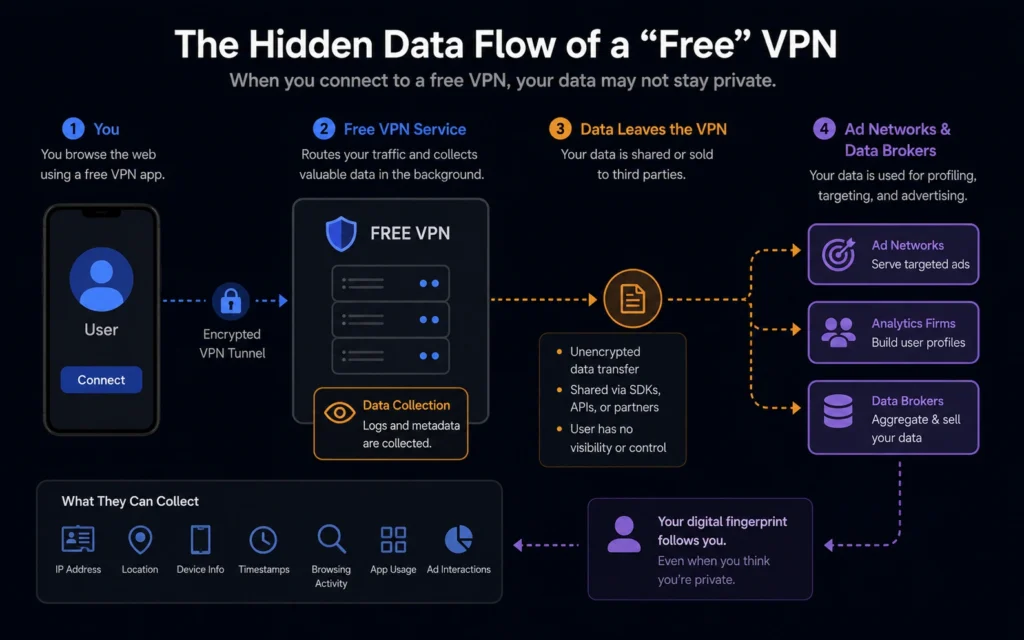
Free VPNs make money by turning user data or attention into revenue. Common paths:
- Selling browsing data to data brokers or advertisers (your visited domains, timestamps, device identifiers)
- Pushing intrusive ads and pop-ups, and redirecting to sponsored pages
- Capturing screenshots or UI data without restriction—creating a surveillance vector beyond network traffic
- Requesting excessive permissions (LOCATION_ALWAYS on iOS; AUTHENTICATE_ACCOUNTS on Android)—giving the app control over identity or location even when not in use
Protocol context matters. WireGuard is modern and fast; OpenVPN is mature and widely supported; IKEv2 is good for mobile. Free apps often use weak or outdated protocols like PPTP, which leaves you vulnerable to data theft and other threats.
The kill switch is the feature that tells you whether a VPN is serious or decorative. Most work fine. Then your connection drops, the kill switch doesn’t trigger, and your real IP is visible for ninety seconds while you wonder why Netflix stopped loading. The ones worth paying for don’t let that happen.
What the Research Shows: 65–66% of free VPNs carry critical privacy risks
A 2025 security study reviewed 800 free VPN apps on Android and iOS and found more than 65% exhibited risky behaviors and APIs, including the ability to capture screenshots without restriction. Over 22% showed insecure activity launch—allowing attackers to skip system checks and misuse parts of the app to run hidden actions.
More than 40% requested excessive permissions, and a quarter lacked any valid privacy manifest—developers’ required declarations of how sensitive data is used.
A CNET summary of the study warns that nearly two-thirds of free VPNs rely on vulnerable coding and put users’ data and privacy at risk. If a company shares or sells your data to advertisers, data brokers, or other third parties, or keeps logs of your activity, find a different VPN.
The Kill Switch, DNS Leaks, and Protocol Reality: what “free” skips
A kill switch blocks all traffic if the VPN drops. That’s the difference between a protected connection and your real IP leaking during a dropout. Many free apps either omit a kill switch or implement it unreliably. If your kill switch doesn’t trigger, your traffic is exposed—often for tens of seconds—until the app reconnects.
DNS leaks happen when DNS queries go outside the encrypted tunnel, revealing your visited domains to your ISP. Free apps often lack customizable DNS settings or leak tests, so you discover the problem only after the fact.
Protocol choice is not cosmetic. WireGuard is modern and fast; OpenVPN is mature and widely supported; IKEv2 handles mobile handoffs well. Free apps frequently default to weak protocols like PPTP, which is outdated and insecure.
When Free Appears Safe—Yet Still Risks Your Data (privacy manifests, audits, jurisdiction)
A “privacy policy” page isn’t proof. A valid privacy manifest is a developer-declared file that outlines how the app uses sensitive data and APIs—especially ones that impact privacy.
Without it, vendor scrutiny is blocked and data flows remain hidden. Independent audits are stronger evidence. Providers audited by named bodies (e.g., PwC, Deloitte, Cure53) with published reports are more credible—though audit records and policy details change—verify at the provider’s site before publishing.
Jurisdiction matters. If a provider is based in a country where data can be seized, the logs question is not theoretical. Some providers have had logs seized by authorities while claiming they didn’t keep any. That’s why jurisdiction and audit status are non-optional checks (Data laws and jurisdiction rules change without notice).
What to Use Instead of a Free VPN: cleaner paid choices and a budget tier that works
A paid plan is often the cleaner privacy choice. You get a kill switch by default, reliable WireGuard, DNS leak protection, and a provider with an independent audit and a clear no‑log policy. A budget tier ($3–$6/month) from an audited provider is usually better than a free app that lacks a kill switch or a manifest.
What a VPN does not do: it doesn’t make you anonymous, protect against malware, or secure your accounts. You still need a password manager, 2FA, and phishing awareness. But for masking your IP and encrypting traffic on public Wi‑Fi or while traveling, a paid VPN is the right protection layer (2025–2026 rates — verify before purchase).
If you’re on a tight budget and must use a free option, cap its use to non-sensitive browsing, disable ad-block overrides, and test for DNS leaks. But for anything more than casual use, choose a paid plan with an independent audit and a kill switch that works.
Cost tiers for privacy-first VPNs (2025–2026)
- Budget tier ($3–$6/month): Audited provider, WireGuard default, kill switch on, no‑log policy. Good for privacy-first browsing and travel.
- Mid-range ($6–$9/month): Adds split tunnelling, stealth/obfuscation for restrictive networks, better mobile UX.
- Worth-the-splurge ($9+/month or enterprise): Multi-region DNS, dedicated IP options, advanced team controls. (2025–2026 rates — verify before purchase)
FAQ: Frequently Asked Questions About Free VPNs and Data Selling
Do free VPNs sell your browsing data?
Many do. A quarter of tested free VPNs lack a valid privacy manifest, and over 65% show risky behaviors. Providers often monetize via browsing data, ads, or permissions (2025–2026 rates — verify before purchase).
How do free VPNs make money if they’re free?
They monetize through data collection and selling, intrusive ads, sponsored redirects, and sometimes selling API access or permissions (2025–2026 rates — verify before purchase).
Are any free VPNs safe to use?
Very few. A paid plan from an audited provider is usually the cleaner privacy choice. Free options often lack kill switches, audits, or proper DNS leak protection (2025–2026 rates — verify before purchase).
What protocol should I use for better privacy?
WireGuard is modern and fast; OpenVPN is mature and widely supported; IKEv2 is good for mobile. Use WireGuard by default if available, and verify kill switch behavior (Audit records and policy details change — verify at provider’s site before publishing).
Does a VPN make me anonymous?
No. A VPN masks your IP and encrypts traffic, but it doesn’t make you anonymous or protect against malware. It also doesn’t secure your accounts (Audit records and policy details change — verify at provider’s site before publishing).
Continue Exploring
- VPN, Privacy, Cybersecurity — This cluster covers use-case recommendations, troubleshooting, and trust audits so you can pick and configure a VPN that actually protects you.