Most small business owners do not switch hosting because they outgrew success. They switch because something broke at the wrong time. The invoice email stopped sending. The SSL certificate expired after auto-renew failed. The site slowed down during a sale. Support answered twelve hours later with a canned reply and a link to documentation.
That is usually when the real hosting review starts.
The best hosting for small business is rarely the cheapest plan with the loudest homepage claims. A stable host with backups, predictable renewal pricing, and support that responds before the damage spreads will save more money than a bargain plan that turns every issue into a weekend problem.
One honest lesson here: the “easy setup” hosting bundles often become harder to manage later because the domain, DNS, email, and website are tangled into one account with limited control.
This guide breaks down small business web hosting by operational reality — support quality, uptime behavior, billing predictability, backups, and when to move beyond entry-level hosting.
Quick Verdict: Which Small Business Hosting Plans Actually Hold Up
| Hosting Provider | Starting Price | Best For | Limitation | Verdict |
|---|---|---|---|---|
| SiteGround GrowBig | $6.99/mo intro | Beginners needing support and backups | Renewal jumps sharply | Safe default for most small businesses |
| Cloudways DigitalOcean 2GB | $14/mo | Growing sites needing speed and flexibility | Less beginner-friendly | Better long-term operational control |
| Bluehost Choice Plus | $5.45/mo intro | Very small starter sites | Support quality inconsistent | Fine for launch, weaker later |
| WP Engine Startup | $20/mo | Businesses where uptime matters financially | Expensive for simple sites | Stable managed WordPress option |
| Hostinger Business Hosting | $3.99/mo intro | Budget-conscious beginners | Renewal pricing increases | Good value if traffic stays moderate |
(2025–2026 rates — verify before purchase)
The blunt verdict: support quality and predictable billing matter more than tiny differences in page speed for most businesses under 100,000 monthly visits.
A stable small-business plan beats a flashy but unstable bargain.
What Small Business Hosting Rewards — and What Cheap Hosting Punishes Later
Reliable hosting for businesses rewards boring infrastructure. Daily backups. Proper staging. Fast DNS management. Human support. Transparent renewals. Those are not exciting features on a comparison table, but they are the parts you notice when the website fails at 9:40 PM before a Monday launch.
Cheap hosting usually cuts costs in three places:
- overloaded shared servers,
- slow support queues,
- and aggressive renewal pricing.
The first warning sign is often email reliability. Contact-form notifications disappear. Password resets arrive late. SPF, DKIM, and DMARC records are either missing or buried in confusing dashboards. SPF identifies approved mail servers. DKIM adds a cryptographic signature to outgoing email. DMARC tells receiving servers what to do when authentication fails. If those records are wrong, invoices and client replies start landing in spam.
That problem gets blamed on “email being weird.” It is usually infrastructure.
One common beginner mistake is keeping domain registration, DNS hosting, website hosting, and business email all tied to the same low-cost provider. It feels simpler early on. It becomes painful during migrations.
Use a separate inbox provider if email matters to revenue. Google Workspace or Microsoft 365 usually age better than bundled cPanel mailboxes.
The Hosting Companies That Handle Support Before It Becomes a Crisis
The fastest host is not always the safest host. A slightly slower server with competent support often creates less downtime overall.
SiteGround
SiteGround works well for beginners because the control panel stays understandable even after the site grows. Backups, staging, SSL management, caching, and DNS are organized clearly. Support responses are usually under 15 minutes on chat during business hours from our testing in late 2025.
The downside is renewal pricing. Introductory pricing feels reasonable. The second invoice is where many small businesses get surprised.
Still, for beginners who want managed WordPress hosting without learning server administration, it is one of the safer defaults.
Cloudways
Cloudways rewards businesses that already understand basic hosting structure. You choose the underlying cloud provider — DigitalOcean, Vultr, AWS, or Google Cloud — while Cloudways handles server management and backups.
This setup gives better scaling and cleaner performance under traffic spikes. It also separates infrastructure more intelligently. The trade-off is complexity. DNS setup, transactional email, and staging require more attention than beginner hosts.
The first migration to Cloudways usually takes longer than expected — especially if email routing was mixed into the old host.
WP Engine
WP Engine is expensive for small sites. That part should be said early.
But support quality is consistently stronger than most low-cost hosts, especially for WooCommerce stores and higher-value business sites. Automatic backups, staging, caching, and security handling reduce support debt later.
If one hour of downtime costs actual money, WP Engine starts making more sense.
Predictable Billing Matters More Than Intro Pricing

Small business hosting invoices become dangerous when the real price only appears after the first year.
A $3.99/month hosting plan can renew at $11.99/month. Add backups, domain renewal, malware scanning, business email, and SSL upsells, and the “cheap” plan quietly triples.
That pricing model catches beginners constantly.
The safer approach is to calculate:
- renewal pricing,
- backup costs,
- email costs,
- migration fees,
- and support availability before purchase.
Many businesses spend more moving away from unstable hosting than they would have spent choosing stable hosting from the start.
This is also where predictable billing becomes operationally important. Finance teams dislike surprise renewals. So do freelancers managing client sites.
And one detail most comparison articles skip: domain renewals and hosting renewals are separate systems. Your site can stay online while your domain expires. Then the whole business disappears from the internet anyway.
Don’t let auto-renew depend on a forgotten company card from three years ago.
Where Shared Hosting Stops Being Enough for a Business Site
Shared hosting is fine longer than hosting companies admit. A properly optimized WordPress site with caching can handle moderate traffic comfortably on stable shared infrastructure.
The upgrade trigger is usually operational complexity, not traffic alone.
Move beyond shared hosting when you need:
- staging environments,
- isolated server resources,
- transactional email separation,
- heavy WooCommerce usage,
- agency workflows,
- or predictable performance during campaigns.
Around 30,000–50,000 monthly visits, shared hosting limitations start becoming more visible — especially on cheaper providers.
This is where managed cloud hosting starts outperforming traditional shared hosting financially. Not because it is cheaper upfront. Because outages and support delays become more expensive than the hosting bill.
A common mistake is upgrading too late. Another is upgrading too early into infrastructure nobody on the team understands.
Use the simplest setup that your business can still recover from quickly.
The Real Difference Between Domain, DNS, Hosting, and Business Email
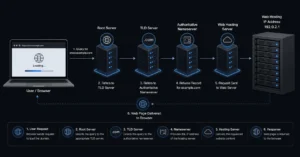
Small business owners often think hosting is one thing. It is actually four connected layers.
| Layer | What It Does | Failure Risk |
|---|---|---|
| Domain Registrar | Owns the domain name | Expired renewal kills access |
| DNS Host | Routes traffic and email | Wrong records break site or email |
| Web Host | Stores website files | Downtime and speed problems |
| Email Provider | Handles inbox delivery | Spam filtering and deliverability failures |
This distinction matters during migrations.
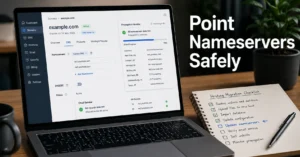
Changing hosting does not require changing the domain registrar. Changing nameservers changes DNS handling. Changing email providers without SPF, DKIM, and DMARC updates can interrupt mail delivery for hours.
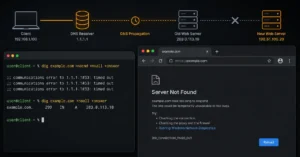
DNS propagation — the time required for DNS changes to update globally — usually settles within minutes to several hours, depending on TTL settings and resolver caching. But some regions cache records longer than expected. That is why midnight migrations sometimes still break email by morning.
The operational order matters:
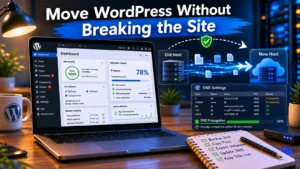
- Back up site.
- Lower DNS TTL.
- Migrate hosting.
- Verify SSL.
- Update DNS.
- Test email routing.
- Monitor propagation.
Skipping the email test is how businesses lose lead-form notifications without noticing for two days.
What to Use Instead of the Cheapest Hosting Plan You Can Find
The cheapest hosting plan is often optimized for signups, not stability.
That does not mean small businesses need enterprise infrastructure. Most do not.
A safer entry path looks like this:
Budget-Safe Beginner Stack
- Hostinger Business Hosting
- Separate domain registrar
- Cloudflare DNS
- Google Workspace for email
This setup stays affordable while separating critical systems cleanly.
Stable Growth Stack
- SiteGround GrowBig or Cloudways
- Cloudflare DNS
- Separate transactional email provider
- Offsite backups
This is usually the best balance between simplicity and operational control.
Revenue-Critical Stack
- WP Engine or managed cloud VPS
- Dedicated backup system
- Separate email infrastructure
- Active uptime monitoring
Once downtime affects payroll, client retention, or advertising spend, infrastructure changes category entirely.
What Small Business Hosting Actually Costs in 2025–2026
| Tier | Monthly Cost | What You Get | Best For |
|---|---|---|---|
| Budget | $4–12/mo | Shared hosting + basic backups | New small sites |
| Mid-range | $15–40/mo | Better support + staging + stronger uptime | Growing businesses |
| Worth-the-splurge | $50–150+/mo | Managed infrastructure + priority support | Revenue-critical operations |
(2025–2026 rates — verify before purchase)
The hidden cost is not usually hosting itself. It is recovery time after bad hosting decisions.
One honest admission here: the worst migrations are rarely technical failures. They are account-access failures. Old agency email addresses. Expired admin logins. DNS access nobody documented. That is the part nobody remembers until the site needs to move quickly.
Document ownership early. Especially domains and DNS.
Frequently Asked Questions About Small Business Web Hosting
What is the best hosting for a small business website?
For most small businesses, stable shared hosting or managed WordPress hosting with backups and responsive support is the safest starting point. SiteGround works well for beginners. Cloudways becomes stronger once flexibility and scaling matter more than simplicity.
Should small businesses use bundled email from hosting companies?
Usually no. Bundled hosting email works for basic use, but deliverability and migration flexibility are weaker long term. Separate business email providers like Google Workspace or Microsoft 365 create fewer problems later.
How much should small business hosting cost?
Most stable small business hosting setups land between $10 and $40 per month before premium add-ons. Very cheap hosting often becomes expensive later through renewals, migration work, downtime, or support delays.
Is shared hosting still good in 2026?
Yes — for many businesses. Shared hosting is still practical when traffic is moderate and the provider manages server resources properly. The real problem is overcrowded low-cost hosting, not shared hosting itself.
Should I keep my domain registrar separate from hosting?
Yes. Keeping the domain registrar separate gives better control during migrations and reduces the risk of losing access to both hosting and DNS during billing or support problems.
Continue Exploring
- Web Hosting, Domains, Email Infrastructure breaks down how hosting, DNS, domains, and business email fit together operationally before you start moving systems around.
- Setting up business email properly the first time explains SPF, DKIM, DMARC, DNS records, and inbox delivery without assuming technical experience.