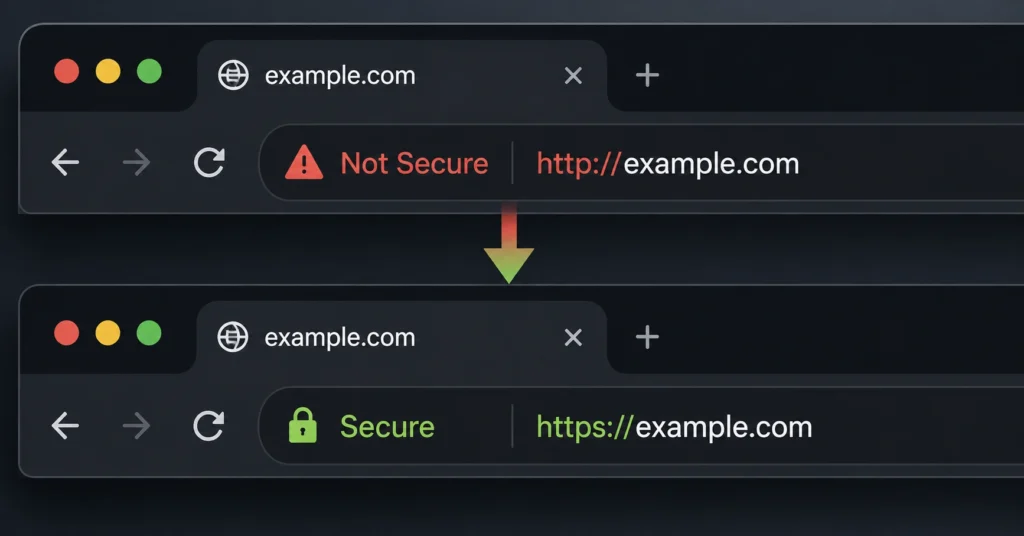
An SSL certificate establishes an encrypted link between a web server and a visitor’s browser to ensure that data passed between them remains private. Without this cryptographic standard, every password typed, form submitted, or credit card number stored on your server travels across the open web in plain text.
This visibility allows malicious entities on the same network node to read or intercept the traffic without detection. Securing your domain path is no longer a luxury reserved for checkout systems; modern infrastructure rules punish unencrypted websites by blocking them behind explicit browser warnings.
The setup looks simple until you realize that an SSL certificate is not a permanent set-it-and-forget-it asset. It is an active lease on a public cryptographic identity that demands consistent server validation and precise renewal timing.
If your validation chain breaks, your site displays an aggressive security alert that drives visitors away before your page content even finishes rendering. This guide peels back the marketing layer to explain how website security actually functions, what different certificate validation types deliver, and how to avoid renewal traps that break business workflows.
What Web Hosting Infrastructure Rewards (and What It Punishes if Set Up Wrong)
Modern web browsers do not negotiate on encryption; they enforce it with strict penalties. If your domain operates on standard unencrypted paths, popular browsers like Google Chrome and Apple Safari append a blunt “Not Secure” notice to your address bar, signaling to potential buyers that your platform is compromised or abandoned.
Core Security Tiers Table
| Option | Price | Best For | Limitation | Verdict |
| Domain Validation (DV) | Free / Included | Blogs, company brochures, and standard content marketing systems. | Only verifies domain control; does not prove company registry details. | The safe, baseline default for 90% of open web projects. |
| Organization Validation (OV) | $50–$150 / yr | Corporate portals and platforms handling non-financial user databases. | Requires manual document review, delaying issuance by several days. | Essential for B2B brands that need explicit identity verification. |
| Extended Validation (EV) | $150–$400 / yr | High-volume enterprise ecommerce applications and banking systems. | High cost with no technical encryption advantages over free options. | A commercial compliance upgrade for major corporate networks. |
(2025–2026 rates — verify before purchase)
Selecting the wrong deployment method can lock you into a loop of configuration failures. For example, if you configure your hosting backend to require encryption but fail to map the underlying server zone records correctly, browsers throw a cyclic ERR_TOO_MANY_REDIRECTS error. This completely breaks public access until you manually realign your routing rules.
What to Know Before You Start Your Configuration
Before buying a premium security certificate from a traditional vendor, you must understand a critical industry truth: paid certificates do not encrypt data any better than free variants.
A domain validation certificate issued for free by Let’s Encrypt uses the exact same Advanced Encryption Standard (AES) mathematical algorithms as a corporate certificate costing hundreds of dollars per year.
What you pay for in premium tiers is not cryptographic strength; you are paying for manual corporate identity verification and legal liability warranties. If you run a high-volume enterprise banking site, manual validation acts as a corporate compliance shield. If you operate an independent ecommerce store or an editorial blog, paying for basic domain encryption is a waste of operating capital.
The Three-Step Chain from Root Trust to the Browser Lock Icon
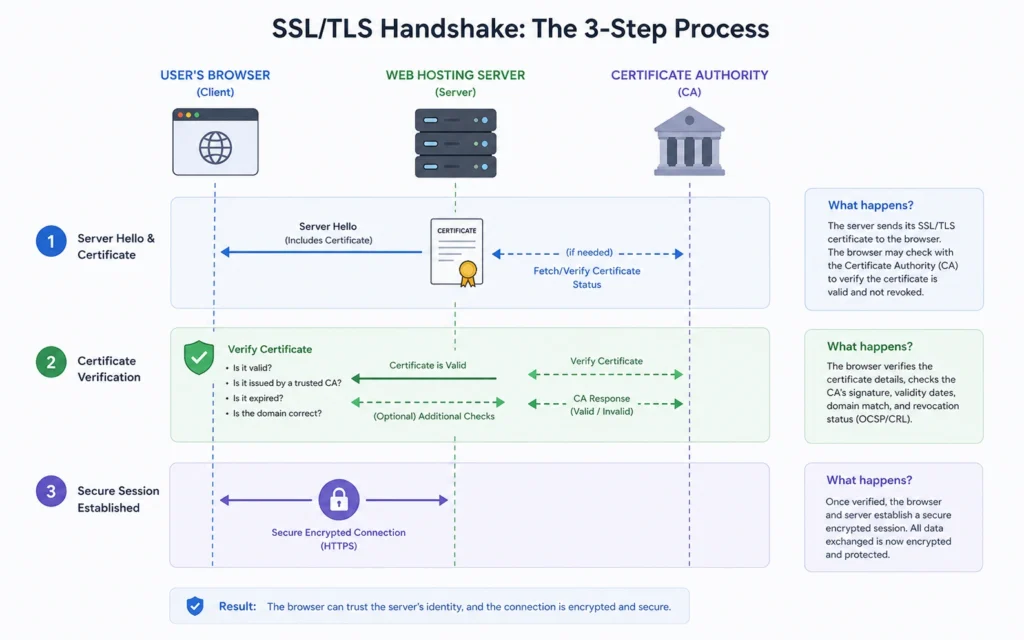
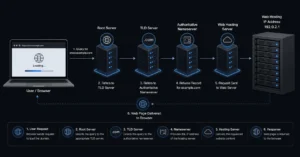
The cryptographic handshake that secures an open session operates through an interconnected chain of validation components. If any single segment fails to connect, the browser marks the entire platform as unsecure.
Component 1: The Certificate Authority (CA)
The bedrock of the system is the Certificate Authority — a globally trusted entity like Let’s Encrypt, DigiCert, or Sectigo. These institutions maintain core root cryptographic keys that are hardcoded directly into the master source code of operating systems and modern web browsers.
Component 2: The Server Handshake
When a visitor requests an encrypted page, your web hosting server presents its unique public security certificate to the incoming browser. This document contains the server’s public encryption key alongside a digital signature explicitly generated by the issuing Certificate Authority.
Component 3: Browser Ledger Verification
The visitor’s browser matches the server’s signature against its internal database of trusted root certificates. If the signatures align, the browser generates an ephemeral symmetric key, encrypts it using the server’s public key, and sends it back to lock the session path. This successful validation triggers the standard security padlock icon in the browser address bar.
Where the System Breaks: The 90-Day Renewal Trap
The primary point of failure for modern website security setups is unexpected certificate expiration. To limit the damage from compromised private keys, the web security industry shifted standard certificate lifetimes down to a strict 90-day window.
If your web hosting setup relies on manual renewals, you are running a ticking clock that will eventually break your site. If a certificate passes day 90 without validation, browsers instantly replace your website content with a full-screen warning page. This screen explicitly notifies users that attackers might be trying to steal their passwords, financial details, or personal files.
[Active 90-Day Lease] -> Automatic Renewal Fails -> [Day 91: Expiration]
                                                          |
                                           +--------------+--------------+
                                           |                             |
                            [Immediate Browser Lockout]      [Total Traffic Drop]
To safeguard your brand against these unexpected blackouts, you must configure automated renewal scripts — like Certbot or host-managed ACME protocols — directly inside your server administration environment. These tools check your domain’s validation records every thirty days and apply fresh security extensions entirely behind the scenes.
What to Use Instead of Your Host’s Obvious Internal Upsells
When setting up a new domain, your registrar or host will likely prompt you to buy an add-on security package at checkout. These upsells are usually overpriced, basic domain validation certificates that you can source elsewhere for zero cost.
Instead of purchasing these baseline host add-ons, route your domain’s nameservers through Cloudflare’s free edge management layer. Cloudflare provides universal edge encryption automatically, completely removing the hassle of manual certificate generation on your local server.
This infrastructure move offloads the heavy lifting of cryptographic processing to localized global networks, protecting your origin server from direct traffic stress and speeding up initial page load times for your visitors.
Frequently Asked Questions About SSL Certificates
What is the difference between SSL and TLS?
TLS is the modern, secure successor to SSL. True SSL protocols are deprecated due to security vulnerabilities, but the industry still uses the term “SSL” as a broad label for website encryption certificates.
Do free SSL certificates provide the same level of encryption as paid ones?
Yes, free certificates use identical high-grade encryption algorithms. Paid options do not offer superior technical protection; they charge fees for manual identity verification and commercial warranties.
Why does my browser show an unsecure warning even after installing SSL?
This usually indicates a mixed content error. Your page source code is likely still loading specific hardcoded assets, like images or scripts, using unencrypted HTTP links instead of HTTPS.
Continue Exploring
- point domain to new host Learn how to point a domain name to custom nameservers without causing unexpected data synchronization errors or disrupting client access channels.
- Web Hosting, Domains, Email Infrastructure Review our complete architectural index to plan, secure, and stabilize your brand’s underlying web delivery systems.