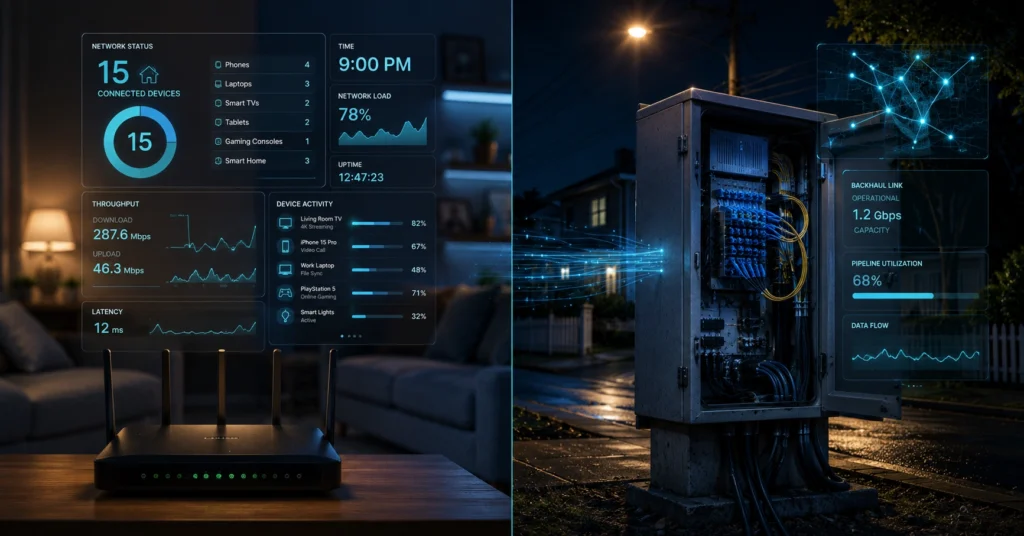
Your internet is slow at night because your internet service provider (ISP) is overloading your neighborhood’s shared data infrastructure, or your home router is failing to prioritize local wireless traffic during high-demand hours.
If your download speeds collapse precisely between 7:00 PM and 11:00 PM, the problem is structural congestion. Upgrading your speed plan with the same provider will not resolve this bottleneck if the physical neighborhood line is saturated. (Policies change without notice).
Quick Diagnostic Block
Before modifying your hardware configuration or calling your internet service provider, use this troubleshooting grid to isolate the layer where your connection speed drops off.
| Problem Source | System Test | Main Bottleneck | Practical Action |
| ISP Congestion | Connect laptop via Ethernet directly to the modem at 9:00 PM; run speed test. | Neighborhood node saturation; oversubscribed local infrastructure loops. | Switch connection medium (e.g., Cable to Fiber or 5G Home Internet). |
| Local Wi-Fi Overload | Run an adjacent router test; contrast with speed test results 30 feet away behind walls. | 2.4GHz frequency interference; bad router channel selection choice. | Migrate high-bandwidth systems to the 5GHz radio band manually. |
| Device Saturation | Disconnect smart televisions and handheld devices; retest line through a single terminal. | Unmanaged background application downloads; cloud data syncing tasks. | Implement Bufferbloat mitigation or Smart Queue Management (SQM). |
| ISP Throttling | Compare standard speed test metrics against an encrypted VPN connection run. | Targeted traffic shape enforcement on video streaming services. | Keep active data streams behind an encrypted network tunnel protocol. |
The Nighttime Drop: Isolating Your Local Network From the Neighborhood Loop
Your internet service provider operates a business model built on a gamble. They sell subscription capacity under the mathematical assumption that every homeowner on your block will not stream 4K video, launch massive game patches, or host remote server connections at the exact same hour. When evening arrives, that assumption fails completely.
The first thing you notice when your connection tanks at 8:30 PM is that the problem looks personal. Websites fail to load, streams drop to blurry resolutions, and gaming ping times climb into unusable triple digits. But before you blame your router or pull out hardware cables, you have to verify where the data flow is actually breaking down.
A slow connection can live in two completely independent zones: inside your drywall, or out on the street corner. If every phone, console, and computer in your house stalls out, you are looking at an architecture failure. If only your desktop struggles while your phone loads media instantly, your home operating systems are fighting for air.
What This Infrastructure Rewards—and What It Punishes if You Choose the Wrong Line
Your choice of internet infrastructure dictates exactly how badly your performance degrades during peak consumption hours. Different delivery mechanisms handle high neighborhood demand in completely different ways.
The Shared Medium: Cable (HFC) and Fiber Splitting Architecture
If you utilize a Hybrid Fiber-Coaxial (HFC) cable line, your data shares a local circuit loop with up to 500 nearby properties. During peak hours internet windows, your line suffers from classic neighborhood line saturation. The physical distribution node on your street corner runs out of downstream capacity. Your packets get stacked in a digital queue, creating catastrophic latency spikes.
Fiber lines handle this burden significantly better, but they are not entirely immune. Gigabit Passive Optical Networks (GPON) split a single 2.5 Gbps optical fiber line among 32 or 64 homes directly at the street optical splitter cabinet.
If four houses on your split are pulling massive database transfers concurrently at 9:00 PM, your packet delivery windows contract sharply.
Local Bandwidth Squeezes: Smart Devices, Background Updates, and Backhaul Stalls
Sometimes the neighborhood is clear, but your own household hardware is choking on its own success. Modern smart televisions, personal mobile devices, and automated gaming rigs are designed to pull background system updates the minute they sense a user is home from work.
[The Local Bottleneck]
   ├── Smart TV (4K HDR Stream - 25 Mbps)
   ├── Console System (Background Patch Update - 150 Mbps)
   └── Smart Phone Cloud Sync (Photo Upload Backhaul - Max Upload Saturated)
         └── RESULT: Bufferbloat inside Router Memory (Ping Spikes to 300ms)
When your console or phone saturates your upload line with a massive photo backup run, it completely chokes your downstream connection path. Download streams require a clear upload path to send continuous TCP acknowledgment packets back to the host server. If that tiny upload lane is completely full, your download speeds stall out entirely.
What to Know Before You Start Diagnosing Your Connection
You cannot fix an internet slow at night issue until you have data that eliminates variable guesswork. Never call your internet service provider with a vague complaint about slow web browsing; their tier-one support desk will simply read a script, instruct you to power-cycle your hardware modem, and close the ticket file. (Check current version support before publishing).
You must rule out your internal local network completely before attempting to hold your provider accountable. This requires tracking exact performance deltas across fixed time increments using direct, un-amplified hardware interfaces.
How to Run a High-Utility Baseline Test and Change Router Channel Settings
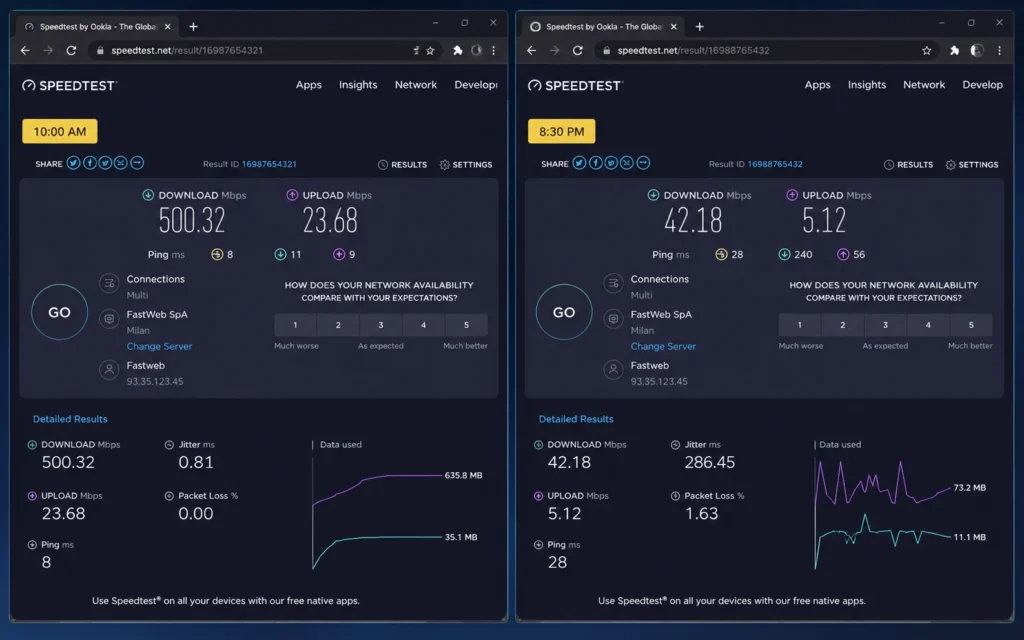
To isolate local Wi-Fi problems from pure ISP congestion, you must completely bypass the wireless radio environment inside your home.
- Step 1: Connect via Ethernet. Locate a Cat6 or Cat5e Ethernet cable. Plug a laptop directly into the primary LAN port on the back of your provider’s gateway modem, completely bypassing independent third-party mesh nodes or standalone routers.
- Step 2: Run a baseline speed test. Open a terminal browser window at 10:00 AM on a weekday morning. Execute a diagnostic run on an independent speed tool like
speedtest.netorfast.com. Document the download speed, upload speed, and raw idle ping latency numbers. - Step 3: Run the evening delta test. Execute the exact same hardware speed test at 9:00 PM from the same Ethernet-connected computer. If the wired speed test matches your morning benchmark but your wireless devices are failing, your local Wi-Fi layer is broken. If the wired speed drops by more than 40 percent compared to the morning baseline, you are dealing with genuine isp congestion.
- Step 4: Change router channel settings. If the wired test is fast but the Wi-Fi is slow, log into your router’s administration interface using its gateway IP address (typically
192.168.1.1). Locate your wireless channel layout. If you are stuck on the overcrowded 2.4GHz vs 5GHz frequency plane, change your 5GHz network setting to a fixed manual channel like 36, 44, or 149 instead of leaving it on Auto mode. This moves your indoor signal away from your neighbors’ competing home routers.
Where It Fits: Plans, Tiers, and Real Prices
Fixing bad evening internet requires understanding what kind of infrastructure your money actually buys. If you are stuck on a legacy line, paying for a premium speed profile is simply throwing money at a broken pipe. (2025–2026 rates — verify before purchase).
| Access Medium Type | Typical Plan Speeds | Real-World Evening Performance Behavior | Monthly Price Range |
| Legacy DSL Lines | 10 Mbps – 100 Mbps | Severely degraded; susceptible to line noise and distance attenuation. | $45 – $70 |
| 5G Home Internet | 50 Mbps – 300 Mbps | High variance; cellular tower prioritization can drop speeds significantly. | $50 – $80 |
| Coaxial Cable (HFC) | 200 Mbps – 1,000 Mbps | Fast day speeds; prone to heavy neighborhood node congestion drops. | $60 – $110 |
| Symmetrical Fiber | 300 Mbps – 2,000 Mbps | Most stable; dedicated light paths preserve speed during peak hours. | $65 – $150 |
What It Actually Costs: Three Tiers of Fixing Bad Evening Throughput
Resolving severe evening network degradation requires matching your financial investment to the actual location of the data bottleneck.
Budget Tier: Hardware Optimizations ($0 – $30)
If the bottleneck is inside your home, the cheapest fix is moving your high-bandwidth devices completely off wireless networks. Buying a 50-foot Cat6 Ethernet cable to wire your primary streaming television or gaming console directly to your router costs less than thirty dollars. This instantly eliminates local wireless channel contention and frees up internal radio airtime for your household mobile devices.
Mid-Range Tier: Smart Router Upgrades ($80 – $220)
If your family saturates the network every evening, your stock provider modem cannot handle the routing processing load. Investing in a third-party router that features Smart Queue Management (SQM) or advanced Quality of Service (QoS) configurations allows you to control data prioritization.
An SQM-enabled router caps aggressive download spikes from a single device, keeping the entire household’s ping times flat even when the main pipe is running under heavy load.
Worth-the-Splurge Tier: Changing Your Access Infrastructure ($65 – $120/month)
If your evening testing proves that your cable provider’s neighborhood node is completely oversaturated, changing your internal home router settings will not help. If your neighborhood has access to a symmetrical fiber provider, you need to execute a clean migration cutover.
Paying an entry cost for a true Fiber to the Home (FTTH) line shifts your evening data stream to an independent optical distribution block that easily survives neighborhood streaming surges.
What to Use Instead of the Obvious Choice
Most consumers assume that when their internet is slow at night, the obvious solution is to call their current provider and upgrade to a higher speed tier. Don’t do that. If your neighborhood loop is maxed out at 8:30 PM, moving from a 300 Mbps plan to a 1,000 Mbps plan changes nothing. You are simply buying a larger ticket for a train that is already stuck on a congested track.
Instead of paying more money to a provider with a saturated network node, look for alternate data distribution paths entirely.
If true fiber isn’t available in your area, look into modern 5G Home Internet alternatives operating on specialized mid-band cellular arrays (like Ultra Wideband or 5G Standalone networks). While cellular setups carry their own performance variances, they tap into an entirely different piece of physical infrastructure than your neighborhood’s buried coaxial cables.
If the local cable loop is choked but the nearby mobile tower has open capacity, a 5G home gateway can deliver significantly more consistent evening performance than a degraded wireline connection.
Frequently Asked Questions About Internet Slowdowns at Night
Why does my internet speed drop specifically between 7 PM and 11 PM?
This window is peak hours internet time. Your neighbors are streaming 4K video, downloading game patches, and hitting the local node simultaneously, causing network capacity limits at the ISP level to saturate.
Will upgrading my tier with the same ISP fix evening lag?
Not if the root cause is neighborhood infrastructure saturation. If the physical line or node is overloaded, buying a bigger data plan simply gives you a larger percentage of a pipe that is already stuck.
Can a bad router cause internet slow at night issues?
Yes. If your router lacks smart queue management or dual-band airtime fairness, local devices running background streaming or backup cloud tasks will choke your ping speeds.
Continue Exploring
Our deep dive into advanced home network troubleshooting strategies can give you the step-by-step terminal commands required to audit local packet dropouts. Knowing how to read your local routing tables ensures you never waste time chasing external provider errors when an internal system configuration fix is all you actually need.