Quick Facts: Beginner Hosting Plans Compared by Setup, Speed, and Renewal Cost
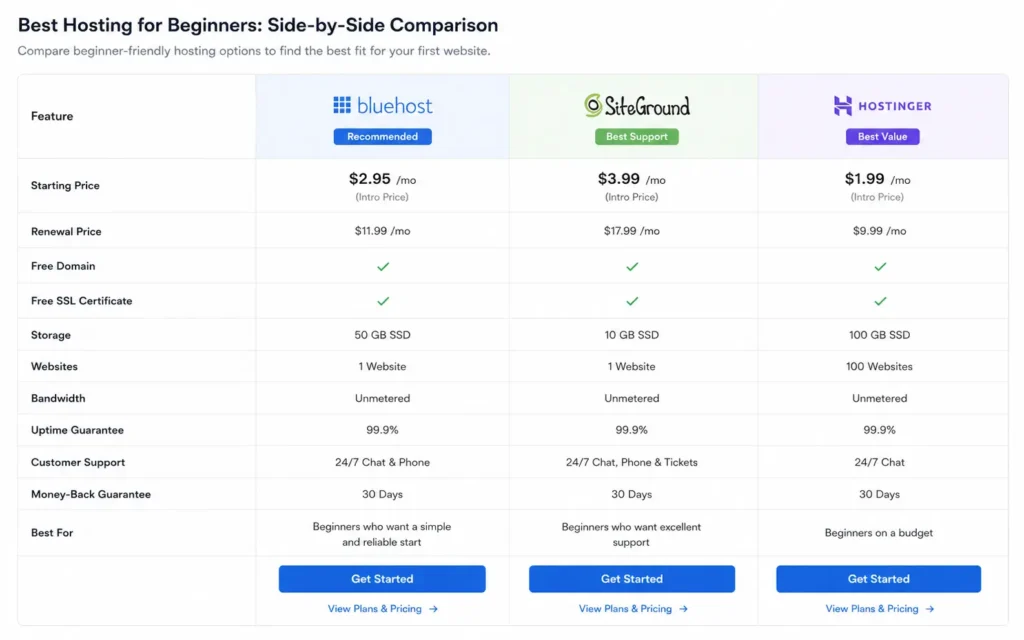
| Hosting Provider | Starting Price | Renewal Price | Best For | Biggest Limitation | Verdict |
|---|---|---|---|---|---|
| Hostinger | Around $2–3/month | Around $8–10/month | First websites and low-friction setup | Support quality varies at busy hours | Best overall beginner balance |
| SiteGround | Around $3–4/month | Around $18–25/month | Beginners who need stronger support | Renewal pricing climbs fast | Better support, worse long-term value |
| Bluehost | Around $3/month | Around $12–15/month | WordPress-first beginners | Dashboard upsells everywhere | Familiar, but noisy |
| Namecheap | Around $2/month | Around $4–6/month | Small static sites and portfolios | Weak performance under heavier traffic | Cheapest stable entry point |
(2025–2026 rates — verify before purchase)
The first thing most beginners notice about web hosting is the homepage price. The second thing they notice is that nothing important was included in that number. SSL works differently than expected.
Email costs extra. Backups are locked behind upgrades. And the dashboard that looked simple during checkout suddenly wants decisions about DNS records, PHP versions, and cache settings.
That is where the real hosting review starts.
After helping new site owners set up blogs, small business pages, portfolio sites, and first WordPress installs, the pattern stays consistent: the best hosting for beginners is usually the provider with the lowest setup friction and the fewest billing surprises in month two.
Raw speed matters. Support matters more. And renewal pricing matters most once the promotional year ends.
This guide compares beginner hosting plans using the parts that affect actual first-month experience: setup clarity, support quality, dashboard usability, performance consistency, and renewal pricing traps.
What Beginner Hosting Actually Rewards — and What It Punishes Fast
Most beginner hosting mistakes are not technical mistakes. They are buying mistakes.
A hosting company can advertise “unlimited bandwidth” and still make basic tasks frustrating. The friction shows up later:
- restoring backups
- connecting email
- fixing SSL errors
- migrating WordPress
- waiting 18 minutes for support chat
That is the difference between a hosting plan designed for customers and one designed for upgrades.
The beginner-friendly hosts usually do four things well:
- one-click WordPress installs that actually work
- automatic SSL provisioning
- clean dashboards
- support that explains instead of linking documentation
And beginners punish themselves fastest when they buy only on introductory pricing.
A $2/month hosting plan that renews at $14/month is not cheap web hosting. It is delayed pricing.
What to Look For in the Best Hosting for Beginners Before You Pay
The best hosting for beginners is not the fastest benchmark winner. It is the hosting stack that survives your first month without forcing you into support tickets every weekend.
Start with setup friction.
If the dashboard hides DNS, email routing, backups, and SSL configuration behind three different menus, you will feel it immediately. This matters more than tiny benchmark differences between shared hosting providers.
Then look at support response quality.
Not availability. Quality.
Some providers answer chat in under two minutes and still fail to solve the problem. Others take six minutes and fix the issue completely in one reply. That difference matters when your domain stops resolving the night before launch.
Here are the practical filters that matter most:
- Free SSL included and auto-renewed
- Daily backups included in base plans
- One-click WordPress installation
- Clear renewal pricing before checkout
- Migration support for future moves
- Email hosting included or transparently priced
- Support available 24/7 with live chat
And check the renewal invoice before paying anything.
Because that is usually the real monthly cost.
The Beginner Hosting Plans That Stay Manageable After Setup
Hostinger — Low friction, cheap entry, tighter limits later
Hostinger is currently the cleanest beginner experience for most first websites.
The hPanel dashboard is simpler than traditional cPanel layouts, and that matters more than people expect. Beginners usually struggle less with DNS, SSL setup, and WordPress installs because the interface reduces menu clutter. A basic WordPress site can realistically go live in under 30 minutes if the domain is already purchased.
The downside appears later.
Resource limits become visible once traffic grows or plugins stack up. Heavy WordPress themes, backup plugins, and aggressive page builders can slow lower-tier plans faster than beginners expect.
Still, for personal sites, portfolios, small blogs, and early-stage projects, it is hard to beat the setup-to-price ratio.
SiteGround — Better support, higher renewal shock
SiteGround is the hosting provider beginners usually appreciate after something breaks.
Support quality is consistently better than most cheap shared hosting companies. Support agents generally explain the issue instead of pasting knowledge-base links. That alone reduces frustration during first setups.
Performance is also more stable under moderate traffic spikes. Caching works well out of the box, and WordPress setup is polished.
But the renewal pricing is where people pause.
A plan that starts around $3–4/month can renew above $20/month once the first term ends. That pricing jump surprises many first-time buyers because the promotional rate dominates the checkout flow.
If support quality matters more than long-term budget, SiteGround still earns consideration. If price stability matters most, Hostinger or Namecheap fit better.
Bluehost — Familiar dashboard, uneven performance under load
Bluehost became popular partly because it is heavily recommended inside beginner WordPress circles.
The onboarding is simple enough. WordPress installs are straightforward. Domain setup is manageable. And beginners usually feel comfortable navigating the interface after a few hours.
But the dashboard pushes upsells constantly.
Security add-ons, SEO tools, backup upgrades, email upgrades — the platform interrupts setup more than it should. That becomes exhausting when you are trying to launch quickly.
Performance also becomes inconsistent once shared servers get crowded. Small sites work fine. Higher plugin loads expose limits earlier than expected.
Bluehost is acceptable for basic WordPress projects. It is not the cleanest beginner experience anymore.
Namecheap — Simple for small static sites and portfolios
Namecheap works best when your site stays small and simple.
Portfolio sites, brochure pages, landing pages, lightweight blogs — those fit well here. Pricing stays lower after renewal compared to most beginner hosting plans, and the company avoids some of the aggressive upgrade pressure common elsewhere.
The trade-off is performance.
Dynamic WordPress sites with heavy plugins or ecommerce extensions can outgrow cheaper Namecheap hosting faster than expected. Support quality is also less consistent than SiteGround during complex issues.
Still, if your goal is “get a simple website online cheaply without surprise pricing,” Namecheap deserves more attention than it usually gets.
Shared Hosting Comparison: The Differences That Matter After Week One
The first week is usually smooth.
The second week exposes the real platform.
That is when beginners start:
- adding plugins
- configuring email
- changing DNS
- testing forms
- enabling backups
- connecting analytics
- installing cache plugins
And that is where hosting providers separate quickly.
The fastest beginner hosting plans are not always the easiest to manage. The easiest dashboards are not always the cheapest long-term. The cheapest introductory offers often become the most expensive renewals.
This is the blunt version:
- Hostinger is the best overall starting point for most beginners.
- SiteGround is better if support quality matters more than budget.
- Namecheap is the cheapest stable option for simple sites.
- Bluehost works, but the upsell pressure gets old fast.
That is the real shared hosting comparison most ads avoid.
Renewal Pricing Is the Part Most Beginners Discover Too Late
Renewal pricing is the real cost trap in beginner hosting.
Not server speed. Not storage limits. Not bandwidth.
Renewals.
Many beginner hosting plans advertise rates below $3/month, then renew between $10 and $25/month after the first term. And the longest contracts usually lock you in before you understand whether you even like the platform.
The smarter beginner move is shorter commitment periods first.
Pay slightly more monthly if needed. Use the first 30 days to test:
- dashboard usability
- support quality
- SSL reliability
- WordPress performance
- email setup
- backup restoration
Because the real value is not the ad price.
It is whether the platform stays manageable once real work starts happening.
(2025–2026 rates — verify before purchase)
Cheap Web Hosting Stops Being Cheap When Email, Backups, and Migration Become Add-Ons
Cheap web hosting only stays cheap if your needs stay tiny.
The moment you need:
- professional email
- staging environments
- malware cleanup
- migration help
- daily backups
- priority support
…the invoice changes.
This is where many first-time site owners accidentally overspend. They buy the cheapest shared hosting comparison winner, then rebuild the missing features through paid add-ons.
Sometimes paying $2 more per month upfront avoids far larger frustration later.
And this is also where managed WordPress hosting starts making sense for some users — especially freelancers or business owners who value time more than server tinkering.
Not every beginner needs the absolute cheapest plan.
Many need the cleanest workflow.
What to Use Instead of the Obvious Choice
The obvious choice is usually whichever hosting company dominates YouTube sponsorships that month.
That is not a buying strategy.
If you are building:
- a portfolio site
- a small business homepage
- a first blog
- a lightweight WordPress project
Hostinger is currently the cleanest beginner stack overall.
If you expect frequent support needs, SiteGround is the stronger support-first alternative despite the renewal jump.
If long-term low pricing matters most and your site stays lightweight, Namecheap is the quieter value option people skip too often.
And if you already know you will scale into ecommerce, memberships, or high plugin counts, shared hosting may not even be the right starting point.
That upgrade path matters more than homepage discounts.
Frequently Asked Questions About Beginner Hosting Plans
What is the best hosting for beginners right now?
Hostinger is the strongest beginner balance for most users because setup is simple, pricing stays relatively low, and the dashboard is easier to understand than older cPanel-heavy layouts. SiteGround is better if support quality matters more than long-term price.
Is shared hosting enough for a first website?
Yes. Shared hosting is enough for most beginner blogs, portfolio sites, and small business pages. Problems usually come from poor support quality or aggressive upselling rather than server limits during the first year.
Why do beginner hosting plans get expensive later?
Most providers advertise promotional pricing for the first term only. Renewal invoices often increase 2x to 4x after the initial contract period ends. Email hosting, backups, and security tools also become paid add-ons on many plans.
Which hosting company has the easiest setup process?
Hostinger currently offers one of the simplest beginner onboarding experiences because the dashboard reduces technical clutter and SSL plus WordPress setup are mostly automated.
Should beginners avoid the cheapest hosting plans?
Usually, yes. The cheapest plans often remove backups, email, staging, or stronger support. A slightly higher monthly price can reduce setup friction and future migration headaches significantly.
Continue Exploring
Web Hosting, Domains, Email Infrastructure breaks down the wider hosting ecosystem, including domains, DNS, email hosting, and migration planning for first-time site owners.
Shared hosting vs managed WordPress hosting explains when cheap shared hosting stops making sense and where managed hosting starts paying for itself.