The absolute cheapest shared hosting tiers are built to secure an immediate sign-up, not to sustain a professional business website over the long haul. Selecting the best cheap hosting requires bypassing the massive banner prices on the homepage and looking directly at the renewal invoices, backup limits, and hardware allocations.
If you need a reliable production site that stays online during traffic spikes, skipping the bottom-tier $1.99 promo plan for a slightly higher performance tier is the smartest economic play you can make.
The data below outlines the real functional constraints and long-term expenses of the market’s primary low cost web hosting configurations.
| Provider Plan | Intro Price | Renewal Price | Best For | Hard Limitation | Blutap Verdict |
| Hostinger Premium | $2.99/mo | $7.99/mo | Multi-site beginners | No dedicated staging tool on entry tier | Best overall balance of entry speed and clear pricing. |
| DreamHost Shared Starter | $2.59/mo | $5.99/mo | WordPress testing | No included business email mailboxes | Reliable uptime framework but lacks basic inbox tools. |
| Bluehost Basic | $2.95/mo | $11.99/mo | Single static pages | 400% renewal price increase after year one | Severe price cliff makes long-term use inefficient. |
| A2 Hosting Startup | $2.99/mo | $11.99/mo | High-security builds | 1-site limit and restricted NVMe storage | Great raw performance until you need a second domain. |
The Hidden Renewal Gap: What Low Cost Web Hosting Actually Costs
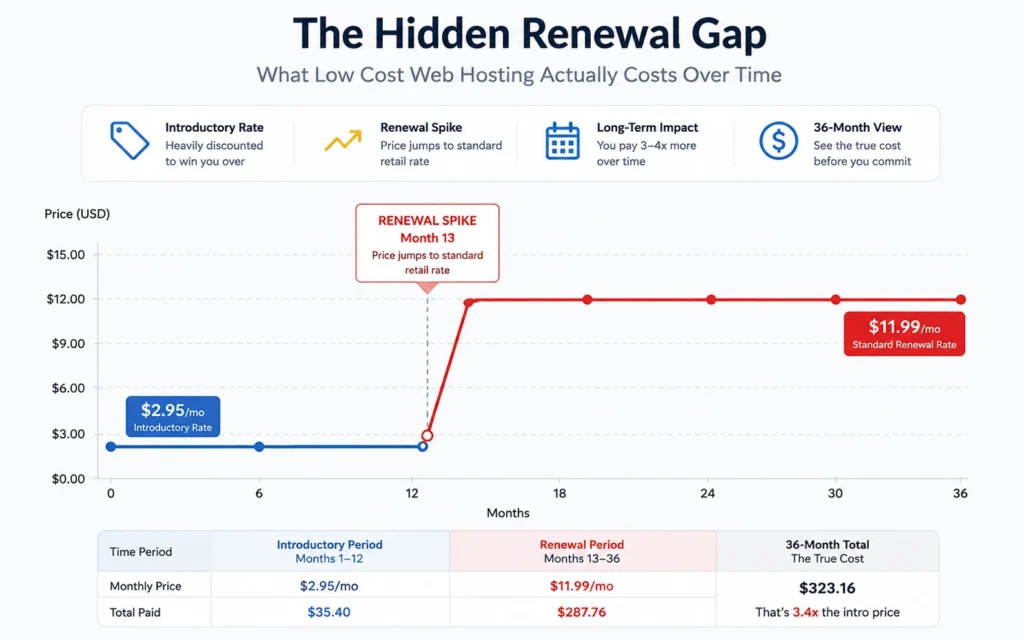
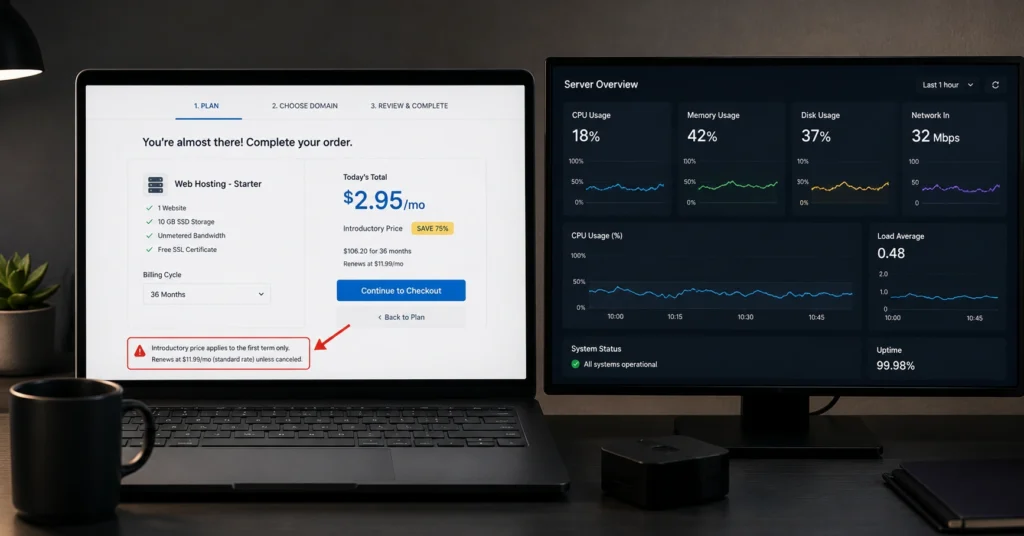
The initial price tag on a budget hosting review is an acquisition tool, not a sustainable operational cost. Most entry-level web infrastructure companies subsidize the first 12 to 36 months of server maintenance to get your payment card on file. The true structural cost reveals itself at your first automatic renewal billing cycle.
[Month 1–12: Promo Rate ($2.95/mo)] ──> [Year 2 Renewal: Standard Rate ($11.99/mo)] ──> [Result: 306% Cost Spike]
This pricing cliff catch site owners off guard because it occurs automatically via pre-authorized billing. When a service jumps from under three dollars a month to over eleven dollars a month, the economic advantage of selecting that specific provider vanishes.
Over a three-year timeline, an affordable hosting plans selection that looked cheap on day one can finish costing more than an intermediate cloud configuration.
You must read the checkout fine print before confirming any order. Many hosts require you to lock yourself into a strict 36-month contract up front to secure the heavily discounted rate shown on their marketing material.
If you opt for a flexible month-to-month billing cycle instead, that advertised $2.50 rate regularly jumps immediately to $10.00 or more from your very first invoice.
Hostinger Premium: What This Budget Platform Rewards and Where It Breaks
Hostinger has scaled its operation by targeting the exact intersection of minimal cost and usable hardware specifications. Their Premium shared tier offers a generous allotment of 100 GB NVMe storage and unmetered bandwidth, which easily outpaces the restrictive storage caps of legacy competitors.
The custom hPanel management interface is clean, responsive, and avoids the cluttered design choices found in traditional cPanel environments.
But that low entry threshold comes with distinct operational constraints that you will notice during site setup. While the plan permits hosting up to 100 separate websites, the server resources—specifically the 1 GB of RAM and limited CPU allocations—are shared across every domain you attach to that single account.
If two of your peripheral sites experience concurrent traffic loops, your primary site will encounter noticeable speed drops.
Furthermore, critical developer tools like an automated staging environment are absent from this budget tier, requiring you to copy files manually to a subdomain whenever you want to test code updates safely. If your site outgrows these constraints, you will have to step up to their Business tier at a much higher recurring price point.
DreamHost Shared Starter: A Stable Infrastructure Alternative With Major Email Caveats
DreamHost approaches affordable web infrastructure differently by relying on custom cloud architecture and providing true month-to-month billing options that do not penalize you with extreme price hikes.
The Shared Starter tier runs on solid-state drives (SSDs) and provides automated daily backups as a standard feature, rather than charging for backups as an add-on.
The catch centers entirely on business communication tools. The starter plan completely excludes professional email hosting from the baseline monthly price. If you want an enterprise email inbox matched to your custom domain—such as [email protected]—you must purchase it as an explicit add-on for an extra monthly fee, or manage your mail routing through an external provider like Google Workspace.
[DreamHost Starter Base Plan] + [Optional Paid Email Add-On] = Higher Total Cost Than Competitors
For users who already deploy a separate mail delivery infrastructure, this is a non-issue. But if you are trying to launch an all-in-one business online footprint out of a single dashboard, the added logistical friction and separate billing line items make this specific plan less appealing than a bundled alternative.
Bluehost Basic: The Single-Site Limitation and the Looming Renewal Cliff
Bluehost is one of the most recognizable entry-level brands on the market, but its basic tier features structural limits that require careful consideration. The entry-level plan limits your account to a single website and restricts storage to 10 GB. This storage limit can fill up quickly if you host high-resolution images, large PDF downloads, or unoptimized media libraries.
The most critical operational challenge is the 300% to 400% price increase that occurs at the end of your initial term. Moving from a low introductory rate to a standard retail price of nearly $12.00 per month changes the overall value proposition. At that price point, you are paying standard mid-tier rates for an account that remains restricted to one website.
If you choose this path, you must monitor your storage usage inside the dashboard and watch your contract expiration date closely. If your growth strategy involves launching multiple landing pages or auxiliary web properties over the next two years, this single-site framework will force you into an early upgrade cycle.
The Practical Alternative: Why Mid-Tier Hosting Outperforms Cheap Tiers
Choosing a slightly higher service tier is often more cost-effective than managing the limitations of the cheapest possible plan. Mid-tier configurations generally include dedicated resources, integrated staging environments, and daily automated backups as standard features. This removes the hidden costs and add-on fees that budget providers use to increase the final price at checkout.
The following comparison details the distinct operational differences between low-cost tiers and intermediate configurations:
- Resource Distribution: Low-cost shared hosting places hundreds of individual accounts on a single physical server, meaning an traffic spike on a neighbor’s site can slow down your pages. Mid-tier options use isolated cloud containers to guarantee specific RAM and CPU access for your site.
- Support Response Times: Budget tiers often limit help desk access to automated chatbots or long live-chat queues. Mid-tier plans typically feature direct access to senior technical support staff, reducing your troubleshooting times.
- Safety and Recovery: Affordable plans regularly treat automated backups as a premium monthly add-on. Intermediate plans include daily snapshots with single-click restoration tools, protecting your data against update errors.
If your website generates direct revenue or handles customer leads, the cost of an unexpected outage will quickly wipe out any savings from a cheap introductory rate. Investing a few extra dollars each month for better stability and support is a practical decision for long-term site health.
How to Safely Configure Low Cost Web Hosting Without Performance Bottlenecks
Setting up an affordable web server requires careful optimization to ensure your site loads quickly and runs reliably. Budget hosting environments share physical hardware across multiple users, making performance optimization a priority during installation.
Follow these sequential steps to configure your site for optimal speed on shared infrastructure:
- Select the Closest Server Region: Choose the physical data center location closest to your target audience during checkout to reduce latency and improve site loading times.
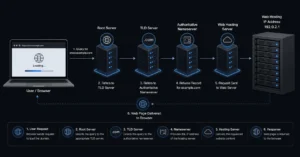
- Optimize Your Nameserver Routing: Avoid using default host nameservers. Route your domain through an external DNS provider like Cloudflare to lower time-to-first-byte (TTFB) and secure your traffic.
- Configure Object Caching: Install a lightweight optimization tool such as LiteSpeed Cache or WP Super Cache to reduce direct database queries and save server CPU cycles.
- Enforce Image Compression: Compress every image asset using WebP formats before uploading to minimize disk space use and keep your site within storage caps.
- Disable Dynamic Admin Actions: Limit background processes like the WordPress heartbeat API to prevent sudden CPU spikes that can trigger resource warnings from your host.
[User Request] ──> [Cloudflare Edge DNS] ──> [Optimized Cache Layer] ──> [Shared Host Server (Reduced Load)]
By shifting the delivery load away from your shared hosting environment, your site can remain fast and responsive even under tight hardware limits.
Frequently Asked Questions About Best Cheap Hosting
Why does my hosting bill double or triple after the first year?
Budget hosting providers use steep introductory discounts to acquire customers, often losing money upfront. When your initial term ends—typically after 12, 24, or 36 months—the billing shifts automatically to the regular renewal rate, which represents the true recurring cost of maintaining your server space.
Can a cheap web hosting plan handle a sudden spike in website traffic?
Most introductory shared accounts fail during sudden volume increases because they operate on restricted CPU allocations and low physical memory limits. If your site experiences an influx of concurrent visitors, the server will throttle your bandwidth, which usually causes a 503 Service Unavailable error for your users.
Do affordable hosting plans include security features like SSL and automated backups?
Basic SSL certificates are standard across most reliable options, but automated daily backups are frequently locked behind premium upgrades or paid add-ons. Relying on a low-tier plan without configuring manual external backups leaves your database vulnerable to data loss during server-side errors or software corruption.
Continue Exploring Infrastructure Solutions
- Web Hosting, Domains, Email Infrastructure Review our comprehensive technical testing guides and architectural analysis to help you configure, scale, and secure your underlying web properties without overpaying for enterprise infrastructure.