If you only need to fix one dead zone, a good Wi‑Fi extender is cheaper and often enough. If you want seamless coverage across a large or multi‑storey home, mesh Wi‑Fi is the fix that actually works long‑term. The right choice depends on your home layout, budget, and how much setup you’re willing to do (2025–2026 rates — verify before purchase).
Most people buy the wrong device because they treat all coverage problems the same. A single dead spot in one room is not the same problem as weak signal on every upper floor. Mesh rewards a whole‑home rebuild and punishes half‑measures.
An extender rewards a targeted fix and punishes placement mistakes. This post compares coverage shape, real cost, and setup effort so you don’t waste money on the wrong fix.
Quick verdict — mesh for whole home, extender for one dead zone
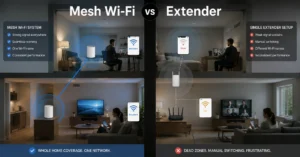
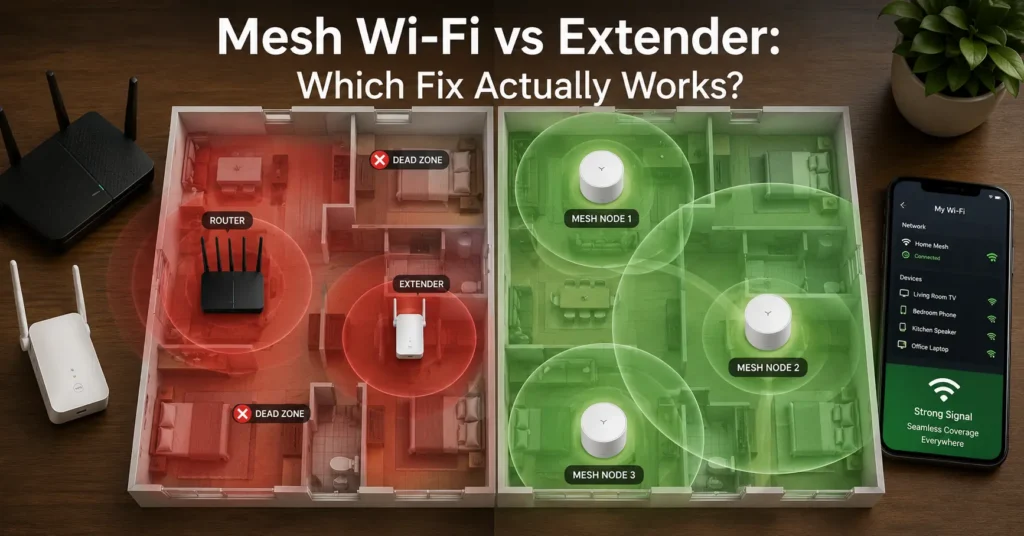
Mesh Wi‑Fi is the better fix if you have a large home (1,800+ sq ft), multiple floors, or dead zones in many rooms. It gives you one seamless network name (SSID) and automatic device switching between nodes. A Wi‑Fi extender is the better fix if you have a small space, a single dead zone, or a tight budget. It’s cheaper, simpler, and works well when placed halfway between the router and the weak spot.
The honest negative: mesh is not automatically better than a strong extender setup. In a small apartment or a home with one problem corner, a well‑placed extender can outperform an under‑specced mesh system for less money. The right device fix depends on the home layout and budget.
What mesh Wi‑Fi is actually like
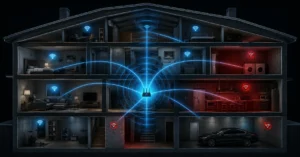
Mesh Wi‑Fi uses multiple nodes to create one big, seamless network. One node connects to your modem or main router, and the others sit around your home to fill coverage gaps. Your devices automatically connect to the closest node with the strongest signal — you don’t switch networks manually.
The first thing you notice with mesh is that setup is app‑driven and Forgiving. You scan a QR code, follow on‑screen steps, and the system places nodes for you. The second thing you notice is performance: speed stays more consistent as you move through the house, especially on tri‑band systems with a dedicated backhaul channel.
Mesh rewards:
- Large or multi‑storey homes (1,800–3,000+ sq ft)
- Multiple dead zones in different rooms
- Smart homes with many connected devices
- Users who want one network name and automatic roaming
Mesh punishes:
- Tight budgets (nodes cost more upfront)
- Small spaces where one router already covers most rooms
- Users who want a plug‑in device with no app setup
- Wireless backhaul on 2.4 GHz only (speed drops significantly)
A specific observation: on a dual‑band mesh with wireless backhaul, real‑world speed at the far node often drops 40–60% compared to the main node. Tri‑band mesh with a dedicated backhaul channel cuts that loss to around 15–25%.
What a Wi‑Fi extender is actually like
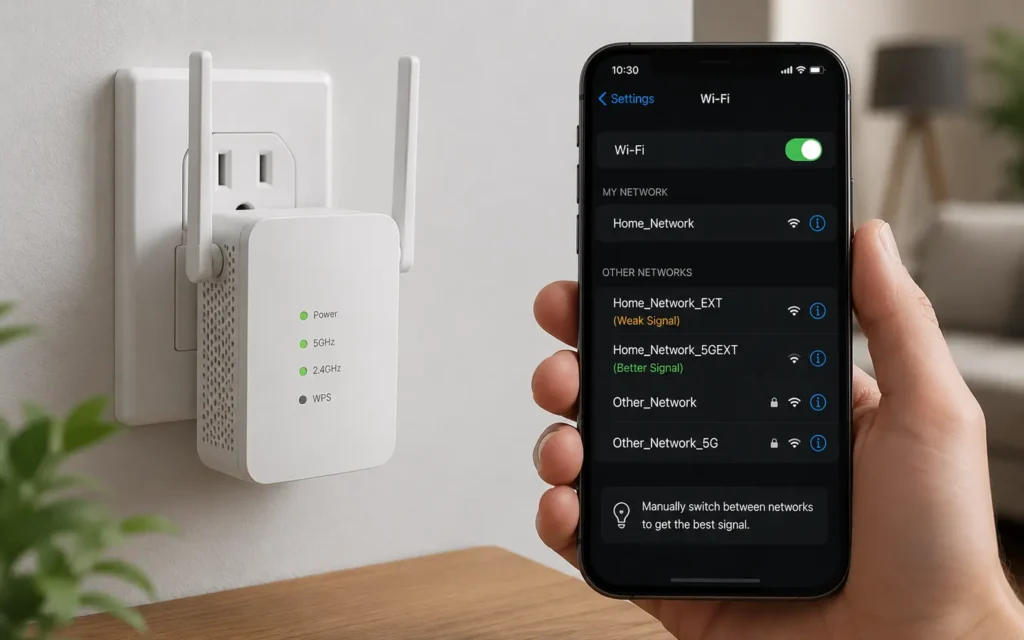
A Wi‑Fi extender (also called a repeater or booster) is one simple device that amplifies your existing router’s signal and rebroadcasts it further. You plug it into a power outlet halfway between the router and the dead zone, then connect to its network.
The main drawback is that your devices will not switch between the router and extender automatically. You often see two network names (SSID), and you must manually switch to the extender’s network when you move closer to it. This can cause a brief disconnect during the switch.
Extenders reward:
- One specific dead zone (a bedroom, home office, or garage)
- Small homes or single rooms (up to ~1,200 sq ft total)
- Budget‑conscious buyers (often $30–$60 for a good model)
- Users who don’t mind manual network switching
Extenders punish:
- Large or multi‑storey homes (coverage stays patchy)
- Users who want seamless roaming
- Heavy bandwidth tasks (streaming 4K, large downloads) on the extended network
- Poor placement (too close to the router or too far)
A precise observation: on most single‑band extenders, available bandwidth is cut roughly in half because the device uses the same channel to talk to the router and to your devices. Dual‑band extenders are better but still rarely match mesh performance.
The differences that change the decision
The difference between mesh and extender is not just “price”. It’s how coverage is shaped, how devices roam, and how much speed you lose.
| Option | Price (2025–2026 rates — verify before purchase) | Best For | Limitation | Verdict |
|---|---|---|---|---|
| Wi‑Fi extender (single unit) | $30–$60 | One dead zone in a small home | Manual network switching; speed often halved | Choose if you need a cheap, targeted fix |
| Dual‑band mesh 2‑pack | $120–$200 | 1,200–1,800 sq ft, 1–2 floors | Wireless backhaul can reduce speed at far node | Good mid‑range whole‑home option |
| Tri‑band mesh 3‑pack | $250–$450 | 1,800–3,000+ sq ft, multi‑storey | Higher upfront cost | Best for seamless coverage and performance |
The differences that matter most:
- Coverage shape: Mesh creates one big, overlapping coverage bubble. An extender creates a second, smaller bubble that doesn’t merge seamlessly.
- Roaming: Mesh automatically switches your device to the best node. Extenders require manual switching between networks.
- Speed loss: Extenders often cut speed in half. Dual‑band mesh loses 40–60% on wireless backhaul; tri‑band loses 15–25%.
- Scalability: You can add more mesh nodes easily. Adding more extenders often makes coverage worse due to interference.
Choose mesh if you are this user
Choose mesh Wi‑Fi if:
- Your home is 1,800+ sq ft or has two or more floors
- You have dead zones in multiple rooms
- You want one network name and automatic device switching
- You run a smart home with many devices (cameras, locks, speakers)
- You can spend $120–$450 upfront for a 2‑pack or 3‑pack system
In this case, mesh is the fix that actually works. It rewards a whole‑home approach and punishes half‑measures like buying a single cheap node and hoping it covers everything.
If you’re unsure, check your current signal. Use a phone or laptop and walk to the problem area. If signal is below ‑65 dBm in multiple rooms, mesh is the safer choice. If it’s only weak in one corner, an extender may be enough. (Check current version support before publishing)
Choose an extender if you are this user
Choose a Wi‑Fi extender if:
- You have a small home or apartment (up to ~1,200 sq ft)
- You have one clear dead zone (a bedroom, office, or garage)
- You’re on a tight budget ($30–$60)
- You don’t mind manually switching to a second network name
- You’re okay with some speed loss on the extended network
In this case, the extender is the smarter, cheaper fix. It rewards precise placement and punishes vague “somewhere in the middle” guesses. Place the extender halfway between the router and the dead zone, not in the dead zone itself.
A blunt verdict: if you only need to fix one corner of your home, don’t spend $250 on a 3‑pack mesh system. Buy a good dual‑band extender and place it correctly.
Cost comparison: real numbers, freshness tag
| Tier | Option | Price (2025–2026 rates — verify before purchase) | What it gets you |
|---|---|---|---|
| Budget | Wi‑Fi extender (single unit) | $30–$60 | Fixes one dead zone; manual switching; speed may drop 50% |
| Mid‑range | Dual‑band mesh 2‑pack | $120–$200 | Seamless coverage for 1,200–1,800 sq ft; some speed loss on wireless backhaul |
| Worth‑the‑splurge | Tri‑band mesh 3‑pack | $250–$450 | Seamless coverage for 1,800–3,000+ sq ft; minimal speed loss; dedicated backhaul |
Core cost drivers:
- Number of nodes (2‑pack vs 3‑pack)
- Dual‑band vs tri‑band (tri‑band is more expensive but better for speed)
- Wired vs wireless backhaul (wired is best but requires Ethernet runs)
Money‑saving moves that actually work:
- Start with a 2‑pack mesh; add a third node later if needed.
- For one dead zone, buy a dual‑band extender instead of a cheap mesh 2‑pack.
- If you already have Ethernet runs, use wired backhaul with mesh to avoid wireless speed loss. (Back up before you switch anything)
Final recommendation: named, direct, no equivocation
If your problem is one dead zone in a small home, buy a dual‑band Wi‑Fi extender ($30–$60) and place it halfway between your router and the weak spot.
If your problem is weak or patchy signal across a large or multi‑storey home, buy a tri‑band mesh 3‑pack ($250–$450) and set it up with wired backhaul if possible.
Mesh is not automatically better, but it is the fix that actually works for whole‑home coverage. An extender is the fix that actually works for a single, targeted problem. The right device fix depends on the home layout and budget.
Frequently Asked Questions About Mesh Wi‑Fi vs Extender
Is mesh Wi‑Fi better than a wifi extender?
Mesh is better for whole‑home seamless coverage in large or multi‑storey homes. An extender is better if you only need to fix one dead zone and want to spend less. (Check current version support before publishing)
Does mesh wifi slow down your internet?
Mesh can reduce speed slightly on wireless backhaul, especially on 2.4 GHz. A tri‑band mesh with dedicated backhaul or wired backhaul avoids most slowdown. Extenders often cut speed in half because they rebroadcast on the same channel.
Can I use an extender with my existing router?
Yes. Most Wi‑Fi extenders work with any standard router. You plug the extender halfway between the router and the dead zone, then connect to its network manually. (Policies change without notice)
How many mesh nodes do I need for my home?
For 1,200–1,800 sq ft, a 2‑pack usually suffices. For 1,800–3,000 sq ft or multi‑storey, a 3‑pack is safer. Add nodes only where signal drops below ‑65 dBm. (Back up before you switch anything)
Continue Exploring
- Tech Troubleshooting, How-To — Deeper into router and connectivity fixes, including Wi‑Fi channel setup, DNS changes, and node placement.
- router and connectivity cluster — Adjacent topic: step‑by‑step guides for setting up mesh, configuring extenders, and fixing slow Wi‑Fi.