A landing page does not need a huge server. It needs consistency. Fast TLS handshakes. Stable uptime. DNS that does not drift for six hours while your ads are already running. Most failed launches are not caused by design problems. They fail because the hosting stack was treated like an afterthought.
The first thing beginners underestimate is SSL timing. The second is DNS propagation. A landing page can look finished inside WordPress while the domain still throws certificate warnings, form submissions fail, or half the visitors hit the old IP address. That is usually where “cheap hosting” stops being cheap.
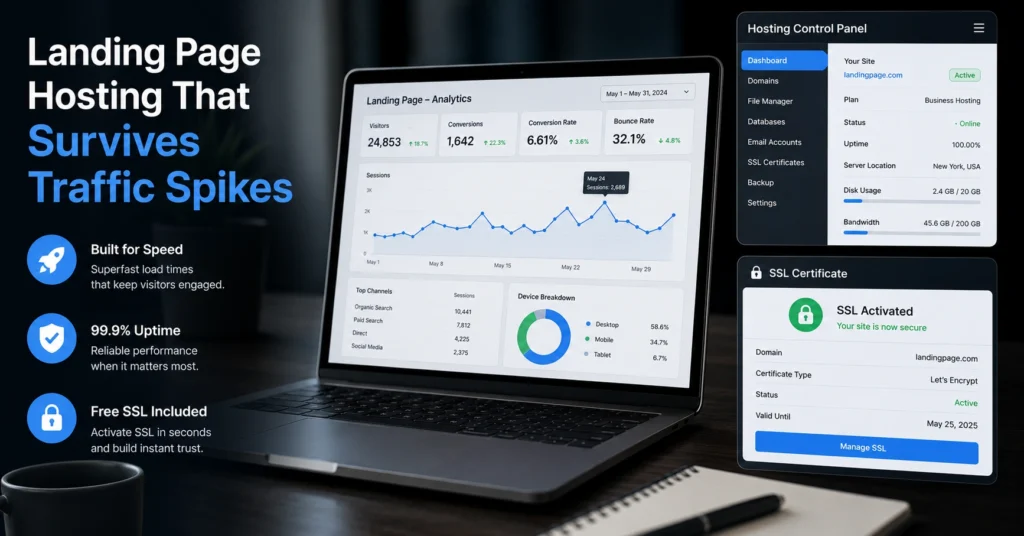
The best hosting for landing pages is the setup that gets four things right: uptime, SSL readiness, page speed, and recovery when something breaks. That matters more than unlimited storage banners or bundled extras you will never touch.
Quick comparison: the best hosting for landing pages in 2026
| Option | Price | Best For | Limitation | Verdict |
|---|---|---|---|---|
| SiteGround StartUp | $3.99–$17.99/mo (2025–2026 rates — verify before purchase) | Beginners launching campaigns | Renewal pricing jumps sharply | Safest beginner default |
| Cloudways DigitalOcean 1GB | $14–$16/mo (2025–2026 rates — verify before purchase) | Predictable campaign traffic | Slightly steeper setup | Best performance-to-control balance |
| Hostinger Premium | $2.99–$9.99/mo (2025–2026 rates — verify before purchase) | Budget-first launches | Support quality varies during spikes | Cheap starting point |
| Netlify Free/Pro | $0–$19/mo (2025–2026 rates — verify before purchase) | Static landing pages | Not ideal for plugin-heavy WordPress | Fastest static delivery option |
The blunt reality: most landing pages do not fail because the server is slow. They fail because SSL issuance stalled, DNS records were misconfigured, or the host throttled resources during traffic spikes.
What this setup actually demands before you launch traffic
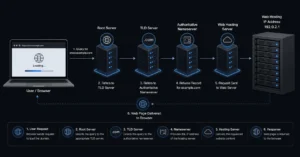
Landing page hosting is a chain. Domain registrar. DNS host. Web host. SSL provider. Email routing. If one breaks, the entire launch feels broken to visitors.
A beginner trap appears when everything lives in different dashboards. The domain sits at one registrar, DNS points elsewhere, email uses Google Workspace, and the page itself runs on shared hosting. That setup is normal. The problem is that nobody explains the dependency order.
Here is the order that actually matters:
- Domain registration
- DNS configuration
- SSL issuance
- Hosting deployment
- Email authentication
- Form testing
- Traffic launch
Skip the testing step and you discover the problem through paid clicks instead of previews. That gets expensive fast.
And yes — SPF, DKIM, and DMARC matter even for simple landing pages. SPF defines which servers can send email for your domain. DKIM adds a cryptographic signature. DMARC tells receiving inboxes what to do when authentication fails. Ignore them and your lead notifications or outbound follow-ups can land in spam.
Shared hosting is fine until SSL, traffic spikes, and forms collide
Shared hosting still works for small landing pages. The internet did not suddenly become too advanced for it. But the trade-off is resource contention.
The problem appears during campaign bursts. One shared server can hold hundreds of accounts. If another customer spikes CPU usage, your page speed can swing from 1.8 seconds to 5 seconds without warning.
That matters more than people think.
Paid traffic behaves differently from blog traffic. Visitors arrive in concentrated waves. They hit forms simultaneously. TLS negotiation increases server load. Then WordPress plugins pile on extra requests — tracking scripts, popups, analytics, chat widgets, conversion tools.
The homepage still loads. The conversion flow breaks.
This is where better hosting earns its price. Not during idle hours. During stress.
The specific hosting setups that work for new product landing pages
SiteGround StartUp — safest beginner default
SiteGround is the easiest recommendation for beginners because the SSL flow, backups, staging tools, and caching are harder to misconfigure than most low-cost hosts.
Its Site Tools dashboard avoids one common beginner failure: broken DNS edits after nameserver changes. SSL certificates usually provision within minutes if DNS propagation already completed. That sounds small until you have seen a campaign delayed because “pending SSL” stayed stuck for three hours.
The honest negative is renewal pricing. Introductory pricing looks attractive. Renewal rates do not.
Still, if you want the safest “launch and recover gracefully” setup, SiteGround is the stronger default over ultra-budget hosts.
Cloudways DigitalOcean 1GB — better once campaigns become predictable
Cloudways sits in the middle ground between beginner hosting and raw cloud infrastructure.
You get dedicated resources, better traffic stability, and cleaner scaling than shared hosting. The DigitalOcean 1GB server is enough for many landing page campaigns with moderate traffic and optimized assets.
But this setup rewards people willing to learn a little infrastructure logic. DNS setup is less hand-held. Email hosting is separate. Transactional email often needs services like Brevo or Mailgun.
The payoff is consistency.
This is the setup many people move to after their first serious campaign spike exposes the limits of cheap shared hosting.
Hostinger Premium — cheap entry, tighter limits
Hostinger works when budget matters more than flexibility.
The control panel is simpler than cPanel for beginners, and setup is fast. SSL provisioning is usually automatic once the domain points correctly. For a basic product validation page, that is often enough.
But support quality varies. And during heavier traffic, aggressive resource limits become noticeable.
The biggest issue is not raw speed. It is recovery friction. When something fails, the debugging process is less graceful than premium hosts.
Use it for low-risk launches. Do not build your long-term campaign infrastructure around the cheapest possible plan.
Netlify — strongest static landing page option
Netlify changes the equation completely because static landing pages behave differently from WordPress installs.
Static sites load fast because there is no database query on every request. SSL deployment is fast. Global CDN delivery is built in. And traffic spikes are easier to absorb.
This is one of the few setups where “fast loading hosting” is not marketing language. Static delivery genuinely reduces moving parts.
But beginners hit a wall when forms, dynamic content, or CMS workflows grow more complex. Netlify is excellent for focused campaign pages. It becomes awkward when people try turning it into a full business platform.
If your landing page is mostly static content plus a form, this is one of the strongest options available.
What not to choose for landing page hosting
Avoid hosts built around oversized “unlimited everything” marketing.
Unlimited storage rarely matters for landing pages. Predictable SSL handling does. Stable DNS propagation does. Recovery tooling does.
And avoid free subdomain builders for paid campaigns.
A branded subdomain weakens trust immediately. Visitors notice. Ad platforms notice. Email deliverability becomes harder later because your infrastructure lacks consistency.
Another trap: bundled email hosting that skips proper authentication defaults. If SPF and DKIM are not configured automatically, beginners often never finish the setup.
Then lead emails vanish silently.
That is the kind of failure that looks like “bad conversions” until someone checks spam logs.
How to set up landing page hosting without breaking DNS or email
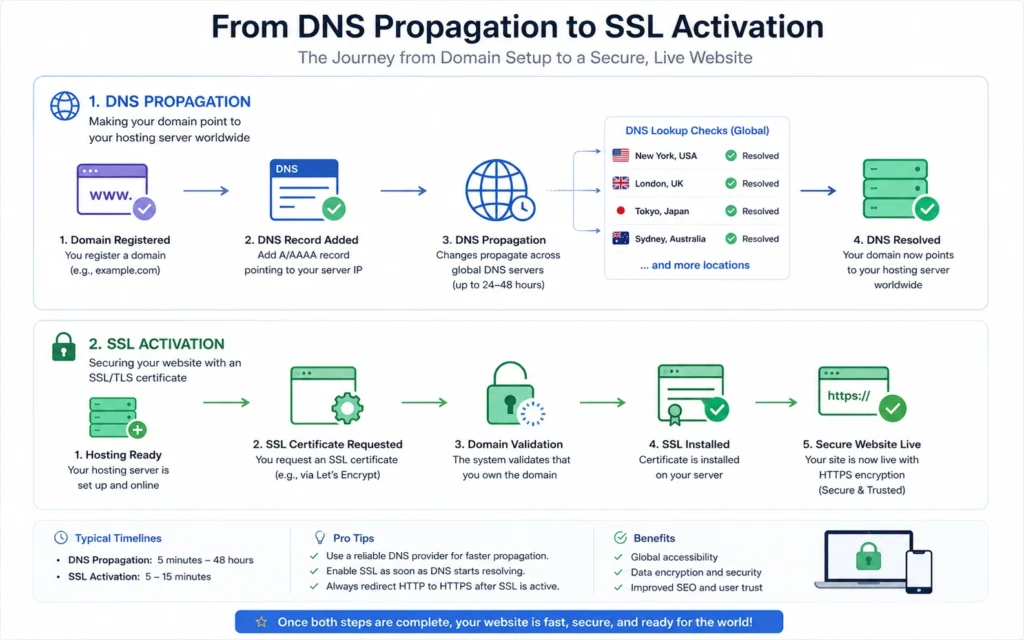
The fastest safe setup path is:
- Register the domain
- Point nameservers or A records
- Wait for DNS propagation
- Issue SSL certificate
- Install landing page platform
- Configure email routing
- Add SPF, DKIM, and DMARC
- Test forms and inbox placement
- Launch traffic
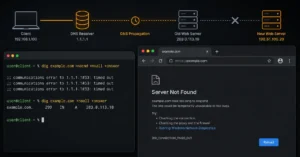
DNS propagation means global DNS systems updating with your new records. TTL — time to live — controls how long DNS information stays cached before refresh. A common TTL value is 300 seconds for temporary migration windows.
One honest admission here: most first-time launch problems happen because people test too early. They change DNS, see partial results locally, and assume the whole internet already updated. It has not.
Use a separate email inbox to test forms before launch. Do not test using the same mailbox provider only once. Gmail accepting the message does not guarantee Outlook or Yahoo will.
Landing page speed is usually a DNS and SSL problem first
People obsess over page builders and ignore TLS negotiation time.
A landing page can have optimized images and still feel slow because the SSL handshake drags, DNS resolution is delayed, or third-party scripts block rendering.
That is why uptime and SSL speed matter more than extras.
The strongest landing page hosting setups reduce connection overhead before the page even renders. CDN distribution helps. Faster DNS providers help. Clean SSL deployment helps more than another visual builder plugin.
One unpopular opinion: most beginner WordPress landing pages use too many plugins. Analytics. Heatmaps. Popups. Live chat. Countdown timers. Social embeds. Five tracking systems layered together.
Then people blame hosting.
What it actually costs to host a landing page stack
| Tier | Monthly Cost | What You Get | Best For |
|---|---|---|---|
| Budget | $3–$6/mo (2025–2026 rates — verify before purchase) | Shared hosting + free SSL | Early validation |
| Mid-range | $12–$25/mo (2025–2026 rates — verify before purchase) | Better uptime, backups, CDN, scaling | Active campaigns |
| Worth-the-splurge | $40–$120/mo (2025–2026 rates — verify before purchase) | Dedicated resources, premium support, advanced delivery | Revenue-critical launches |
Hidden costs appear in:
- domain renewals
- premium email inboxes
- CDN upgrades
- transactional email
- backup retention
- staging features
The cheap monthly price is rarely the real total.
Frequently Asked Questions About Landing Page Hosting
What is the best hosting for landing pages?
For most beginners, SiteGround StartUp is the safest default because SSL setup, backups, and caching are simpler than many budget hosts. If you are building static pages instead of WordPress, Netlify often delivers faster global loading and cleaner deployment workflows.
Does hosting affect landing page conversion rates?
Yes. Slow DNS resolution, unstable uptime, and delayed TLS handshakes increase bounce rates before visitors even see the offer. Hosting affects trust signals too. Browser SSL warnings during a campaign can destroy conversion performance immediately.
Is shared hosting enough for a landing page?
Usually, yes. Small campaigns and early product validation work fine on quality shared hosting. Problems appear during traffic spikes, heavy plugin usage, or weak caching setups. That is when dedicated resources start mattering.
Do landing pages need SPF, DKIM, and DMARC?
Yes if the domain sends email. SPF defines allowed mail servers, DKIM signs outbound mail, and DMARC sets enforcement policy. Without them, lead notifications and follow-up emails are more likely to land in spam folders.
How long does SSL setup usually take?
Most automated SSL systems issue certificates within minutes after DNS propagation completes. But propagation itself can take several hours depending on TTL values and resolver caching. Testing too early is one of the most common beginner mistakes.
Continue Exploring
- Web Hosting, Domains, Email Infrastructure — deeper comparisons, migration guides, DNS setup walkthroughs, and hosting trade-off breakdowns.
- best shared hosting for small business sites — useful if your landing page starts turning into a full business website with email, forms, and ongoing traffic.